On Voice AI
I’ve been building with Voice-First AI over the last 18 months, I’ve tried a lot, learned a lot, seen (should I say heard?) a lot. In this post I’m going to capture some of my learnings, my thoughts, recommendations and considerations of voice-based AI.
I’ve talked before about my first real experience with a modern voice-based AI model:
I was sitting in my car outside my son’s basketball practice, and I decided to try ChatGPT’s voice mode, which had just been released. I ended up having a 20-minute conversation about quantum physics with an AI, a very surreal experience the first time you do it. Not reading text on a screen. Talking. It talked back. I sat in that car park for a while after it ended, thinking about what I’d just experienced.
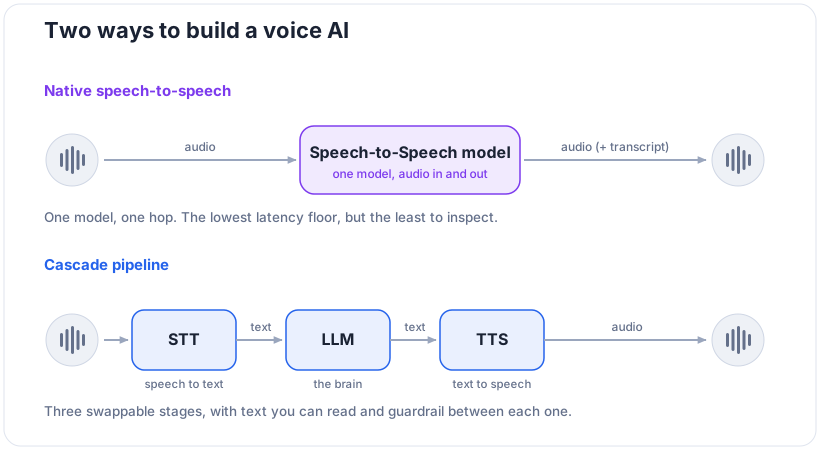
It was a surreal moment, there was no laggy experience like I expected, I could interrupt the AI mid sentence, it could change it’s tone, it laughed. Since then I’ve explored and used lots of different models and voice-approaches to building apps. Native Speech-to-Speech (S2S) and cascaded pipelines each have their own strengths and weaknesses, so before I go too far let me lay out what each is.
Native Speech-to-Speech
S2S models are available from many providers already, like Gemini Live / OpenAI Realtime / Amazon Nova Sonic / Grok Voice for the big providers, or in the Open Source world there are Qwen Omni / Kyutai Moshi / Nvidia PersonaPlex amongst others. Technically speaking they mostly are Speech OR Text in and Speech (plus transcript) out, but we seem to have landed on S2S as the generic catch-all for these models.
Instead of the LLM approach where models take in text, tokenize and embed, then process through the LLM latent space to predict outputs, a S2S model takes audio data directly as input, and outputs audio data directly. This approach obviously is more difficult to train given the modality (just like vision), but the industry/community are rapidly developing bigger and more capable models that seem to compare with frontier LLMs.
Using Native S2S models in your applications is somewhat similar to using an LLM, your harness still needs to establish a connection to the provider, handle auth, tool calls, transcripts, errors etc. But instead of sending/receiving Messages (User/AI text), here you’ll be sending and receiving audio frames. There are model-specific SDKs, and generic frameworks (LiveKit/Deepgram) that can help get you running quickly, but you’ll want to be familiar with the underlying transports that are used like Websockets or WebRTC.
Cascade Speech
Rather than the Audio In/Out approach, the Cascade approach combines Speech-To-Text (STT, also known as ASR), and LLM, and Text-To-Speech (TTS) into a pipeline. This gives you flexibility of models at each stage to optimise for your use case, and the chance to observe and manipulate each stage of the pipeline. You can run this pipeline on your own using Open Source models on your own tin, or use hosted services that add orchestration and other value-adds on top, like that of ElevenLabs / Deepgram / LiveKit. These providers host (or proxy to hosters) for the models, and wrap their services in SDKs for easier consumption in your applications.
Initially you might think, as I did, that this approach would increase latency as the pipeline was processed and lead to a poor user experience, the hosted providers have actually done a good job of spreading hosting across cloud regions worldwide to ensure latency is minimised between user<->provider<->models, meaning the end user experience is comparable to having a human to human conversation.
The ability to mix and match models, and change them over time based on newer SOTA models or cheaper providers gives you flexibility you won’t get from a dedicated S2S model.
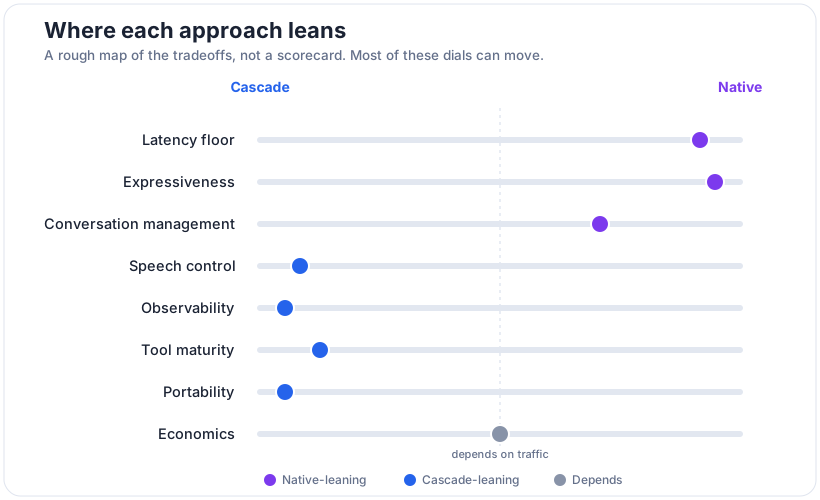
Dimensions to consider
Latency
Humans have communicated with voice long before we invented written language, it’s intrinsic in our nature. So when we start a conversation with a computer system like a Voice AI, we instinctively feel something is off when the conversation doesn’t flow like we expect in human to human interactions. Latency plays a big part here, as a Voice AI system needs to not just talk back in a timely fashion, it also needs to know when to stop talking.
For a conversation to feel natural, the Voice AI service needs to understand when the user stopped talking, construct its response, and stream it back and play it. The gap here is called time-to-first-audio after the user stops talking. Human conversations can have very small gaps, as we are processing a response while the other person is talking, so it can be as low as 200ms perhaps. For most conversations around 800ms to 1s seems natural, but when we start blowing past 1.5s it starts to feel strange. So our Voice AI, S2S or cascaded pipeline, needs to receive and process and respond quite fast to meet the feels right bar.
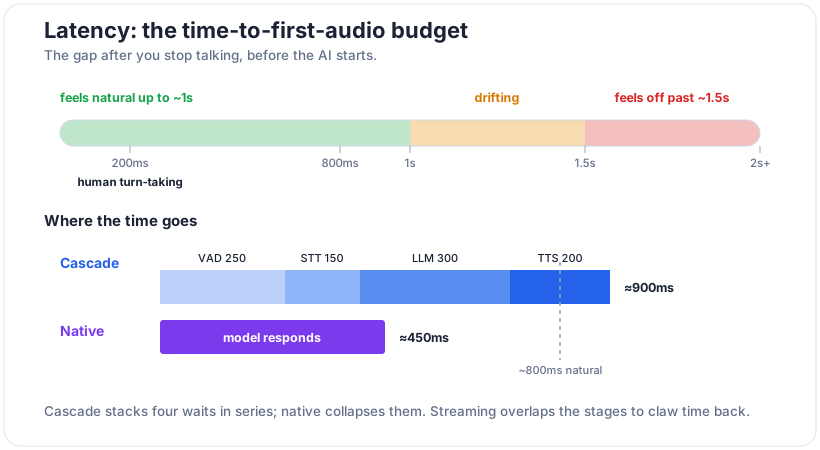
The numbers above are illustrative, not measured, just a feel for where the budget goes.
Native S2S collapses these steps into one model action and therefore can feel more natural, but at the expense of flexibility. In contrast cascaded pipelines use streaming of content between stages to limit latency and provide comparable experiences. Then we layer on normal technical constraints like distance to infrastructure, region failover, packet loss, compute/model coldstarts, and then our model/pipeline latency metrics become even more critical.
Speech Control
Once the timing feels right, the next thing you notice is how the AI sounds. With a cascade you’ve split the voice away from the brain, the LLM decides what to say and the TTS decides how it sounds, and that separation hands you a lot of control. You can pin a single brand voice so every user hears the same character, feed a pronunciation lexicon so it says your product name or a customer’s surname right every time, dial the speaking rate up or down, and switch languages without retraining or even touching the LLM. I leaned on this a lot, when you’re building for kids you really do care that the thing pronounces names properly.
Native S2S gives you something a cascade can’t fake. The model decides delivery itself, so you get human like prosody, the little laugh, the hesitation, the shift in tone when a conversation turns serious. It feels alive in a way a TTS reading flat text struggles to match. The trade is control. Native is more lifelike but you can’t fully guarantee it won’t pick a tone you didn’t ask for, where a cascade is flatter but you know exactly what comes out the other end. If your use case lives or dies on saying names, acronyms or domain terms correctly, lean cascade, native leaves you a bit at the model’s mercy.
Conversation Management
Then there is Voice Activity Detection (VAD), a part of a voice AI system that recognises that a user has started talking and forces any inflight AI speech to stop. This is sometimes called barge-in or interruption management, a natural human action that needs to be accommodated to allow a Voice AI system to feel natural. This is the thing that separates the user experience from alive vs walkie-talkie.
Interruption means stopping TTS playback, flushing buffered audio, and deciding whether the partial counts. Endpointing is the hard part, did the user finish or pause mid-thought? Silence-duration VAD is crude; semantic endpointing (is this a complete utterance?) is the upgrade. Aggressive cuts people off, conservative feels laggy. Native handles turn-taking internally and usually better because it models the stream continuously. In cascade you own this (LiveKit/Pipecat hand you VAD and turn detection, but you tune it). Watch out: real environments break VAD. Your car park, kids in the background, a TV. Test there, not in a silent office.
Observability
This one caught me out, and it’s the thing I’d weigh most heavily if I had my time again. A cascade hands you text at every boundary, the user’s words after STT, the model’s reply before TTS, all of it logged, replayable, and sitting right there to run evals against or drop a guardrail into. Native either hides that text or gives you a transcript alongside the audio that doesn’t always match what was actually said.
That matters more than it sounds. The eval tooling I already knew, Phoenix, Langfuse and the rest, all assume text. None of it runs on audio. So with native you’re either evaluating a lossy transcript or building audio evals, which are still pretty immature. You also lose the natural place to sit a guardrail, that gap between the model understanding a request and speaking the response just isn’t exposed. And a warning worth repeating, a native transcript is reconstructed after the fact, not ground truth, so be careful building your analytics or your safety logic on a transcript that might not match exactly what the user actually heard.
Economics
The billing models are completely different animals, which makes comparing them harder than it should be. Native charges you audio tokens in and out, and audio tokens cost a lot more per minute than text. A cascade splits the bill three ways, STT per minute of audio, the LLM per token, and TTS per character or per second. Which one comes out cheaper depends entirely on the shape of your conversations, so the only honest way to compare is to model it per minute against your own traffic, not off the list prices. A long monologue from the model leans on cheap TTS, lots of short back-and-forth with the AI mostly listening shifts the maths the other way.
I ran this comparison a few times across the cascade providers and Nova Sonic, and the surprises were mostly in the hidden costs. Some native sessions bill you for idle time while the user just sits there silent, there’s bandwidth to account for, and the orchestration providers take a margin on top of the underlying models they’re proxying to. Running it yourself, Whisper plus an open LLM plus an open TTS, trades the per-minute fees for a fixed GPU cost and a pile of ops work, which only pays off at volume. And the trap everyone falls into, demo costs lie. A twenty minute chat on your own is cheap as chips, ten thousand concurrent sessions with retries at the p95 tail is a very different spreadsheet.
Tools
Tool calls are where voice AI can get awkward, because the model has to do something with the silence while it waits on an API. In a chat interface a two second pause is invisible, in a conversation it reads as the thing breaking. The old fix was filler speech, the “let me just check that for you” you’ve heard a hundred times, and that’s still worth having. But the native models have a better answer now: asynchronous, or non-blocking, tool calls. Instead of freezing the conversation until the function returns, the model fires the call off and keeps talking and listening while it runs in the background. Gemini Live has you tag a function NON_BLOCKING, and Nova 2 Sonic added it late last year and will run several tools in parallel.
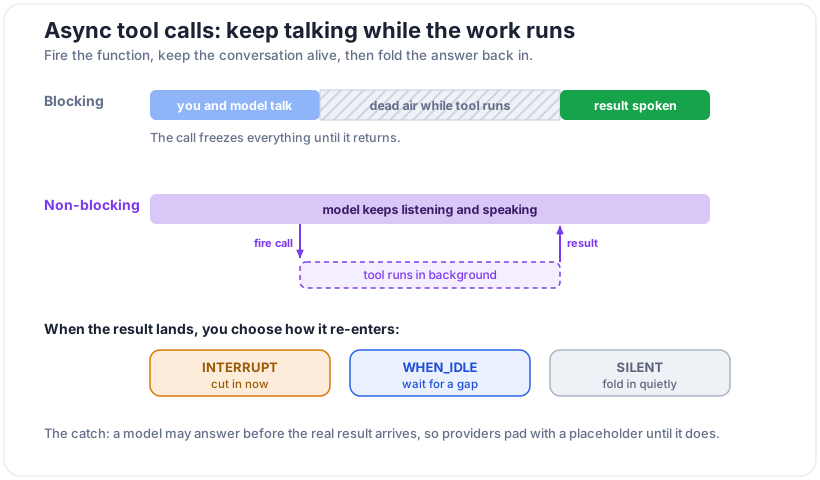
Firing the call is the easy half, handling the result that comes back is where it gets messy. Three things bit me. First, some models will very-happily make something up before the real result lands, who would have thunk it, a model hallucinating? Second, the result usually arrives mid-sentence, so now you have to decide what to do with it, and Gemini actually makes you pick a policy up front: interrupt the current speech, wait until the model’s idle, or fold the answer in silently. Get that choice wrong and the assistant either talks over itself or sits on an answer it already has. Third, the plumbing is still green. The newest Gemini live model didn’t support async at all last I checked, and I’ve watched Nova 2 Sonic deadlock, where speech generated after the tool call blocks the result from ever being delivered, so the conversation stalls until the user says something to unstick it, awkward!
In a cascade none of this is handed to you, which cuts both ways. You’re orchestrating the tool call yourself, so async is something you build rather than a flag you flip, more work, but every step is visible and you decide exactly when the result re-enters the conversation. The rule of thumb I’d leave you with: a blocking tool call needs to come back under a second or it’ll kill the conversation. Async buys you the long-running calls that can’t, but only if you’ve designed for how and when the answer comes home. There’s no version of this where you get to ignore the return trip.
Portability
I think about most now, as I had to port based on changing T&Cs of one provider very late in the build, and partly because of where my head’s at with sovereignty and vendor risk. With native, the model and the voice are welded together. Switch providers and you’re not just changing a backend, your assistant’s actual voice and personality change, and users absolutely notice. A cascade lets you swap the STT, the LLM or the TTS independently as better or cheaper options come along, and over an eighteen month build, believe me, better and cheaper options come along constantly.
There’s a catch in the middle though. The abstraction layers like LiveKit and Deepgram buy you a lot of that portability, but they tend to give you the lowest common denominator across providers, you don’t always get a given provider’s newest tricks. Go provider-native and you get the cutting edge along with the lock-in that comes with it. The bit to really watch is that native is close to a one-way door on voice identity, a custom voice you build on one provider usually can’t come with you when you leave. So we’ll just swap later is a tax you end up paying up front, whether you meant to or not.
Beware the non-technical side
All of the above is the fun engineering part. The part that’ll actually get you in trouble is everything around it. I’m not a lawyer, but a few things came up often enough that you want them on your radar early, not after you’ve shipped.
First, a voice is biometric data. A voiceprint can identify a person, which drags audio into a different category than your usual text logs. GDPR treats it as special category data, several US states have their own biometric laws like Illinois’ BIPA, and Australia’s Privacy Act reforms are tightening here too. Storing a pile of recorded conversations is not the casual thing it can feel like.
Then there’s what the provider does with your audio. Plenty of consumer tiers will train on it by default, while the enterprise tiers or a zero data retention arrangement turn that off, and you really want to know which one you’re actually on, especially if any of your speakers are children. Which brings me to the bit I cared about most building for kids, children’s data is its own world, EU AI Act in Europe and COPPA in the US and equivalents elsewhere, and it’s a big reason why my business went the direction it did, the data handling guarantees were the whole point.
The last cluster is consent and disclosure. Depending on where your users are, you may be legally required to tell them they’re talking to an AI at all, the EU AI Act has transparency rules along these lines, and plenty of jurisdictions need consent before you record a conversation in the first place. If you’re cloning a voice, the provider’s terms almost certainly require the consent of the person being cloned, don’t skip that one. And underneath all of it sits data residency, where the audio is actually being processed, and who can compel access to it once it’s sitting there. None of this is as fun as chasing latency or experimenting with cool voices, but it’s the stuff that decides whether you’ve built a product or a liability.
Conclusion
So which one should you use? I’m going to resist handing you a winner, because there isn’t one. The fork comes down to what you’re optimising for. If you need control, observability and predictable costs, a cascade gives you that, at the price of a little of the magic. If you want the lowest latency floor and that alive feeling, native gets you there, and you give up some control and a lot of visibility to do it. Today I tend to reach for a cascade like ElevenLabs when the thing has to be auditable or run cheaply at scale, and native like Gemini when the experience itself is the product and it has to feel human. Ask me again in six months though, because the two approaches are quietly converging, native is getting more controllable and cascades are getting faster, so wherever the line sits today, it’s going to move.
One last thing worth saying out loud. Sometimes voice is just the wrong interface. For anything that needs precision, or scanning back over information, or careful review, or just doing quietly in a room full of other people, a screen still wins and it isn’t close. Voice is great when a conversation is the right shape for the problem. The skill I’m still working on, even after eighteen months, is telling the difference between when that’s true and when I’m reaching for it because it’s the shiny new toy. Mostly it’s the right call. Occasionally it isn’t, and the honest work is admitting which before you build, not after.