Teaching AI to See
Part 4 of a series on Claude API features for builders
So far in this series we’ve given Claude the ability to think deeply, take actions, and speak in exact formats. But everything up to this point has been text in, text out. In this post we’re crossing into a different territory: giving Claude eyes.
Vision and PDF support are the features that let Claude understand images and documents, not just the text in them, but the charts, diagrams, layouts, photographs, and visual information that make up so much of how the real world communicates. If you’ve ever wished you could just throw a screenshot, an invoice, a floorplan, or a research paper at an AI and have it understand what it’s looking at, this is how you do it.
And for me personally, this is one of the capabilities I use all the time. So much of the information in a business context lives in documents that were never designed for machine consumption. PDFs, scanned contracts, dashboards exported as images, handwritten notes photographed on a phone. Vision turns Claude from a text processor into something that can engage with the messy visual reality of how information actually exists.
How vision works in the API
The mental model is simple: you send images to Claude alongside your text prompt, and Claude can see and reason about them. Under the hood images are converted to tokens (roughly calculated as width × height / 750), and Claude processes them through the same architecture it uses for text. This isn’t a separate computer vision model bolted on, it’s the same reasoning engine applied to visual input.
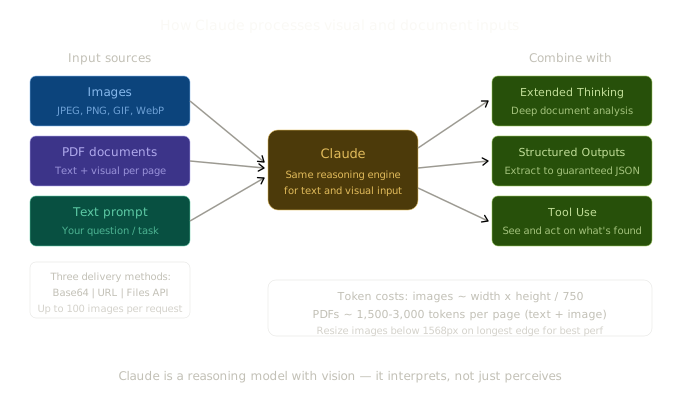
Claude supports JPEG, PNG, GIF, and WebP images, and you can send them three ways: as base64-encoded data, as a URL reference, or via the Files API (upload once, reference by ID in future requests).
Here’s the simplest possible example, sending an image from a URL:
import Anthropic from "@anthropic-ai/sdk";

const client = new Anthropic();

const response = await client.messages.create({
  model: "claude-sonnet-4-6",
  max_tokens: 1024,
  messages: [
    {
      role: "user",
      content: [
        {
          type: "image",
          source: {
            type: "url",
            url: "https://example.com/quarterly-dashboard.png",
          },
        },
        {
          type: "text",
          text: "What are the key trends visible in this dashboard?",
        },
      ],
    },
  ],
});
And here’s the base64 approach, which you’d use when working with local files:
import Anthropic from "@anthropic-ai/sdk";
import * as fs from "fs";

const client = new Anthropic();

const imageData = fs.readFileSync("./invoice.png").toString("base64");

const response = await client.messages.create({
  model: "claude-sonnet-4-6",
  max_tokens: 1024,
  messages: [
    {
      role: "user",
      content: [
        {
          type: "image",
          source: {
            type: "base64",
            media_type: "image/png",
            data: imageData,
          },
        },
        {
          type: "text",
          text: "Extract all line items from this invoice, including descriptions, quantities, and amounts.",
        },
      ],
    },
  ],
});
A couple of important details. Claude can handle up to 100 images in a single API request (20 in the chat UI), which means you can send an entire document’s worth of screenshots, a set of product photos for comparison, or multiple charts for cross-referencing. Images should ideally be under 1568 pixels on the longest edge. Anything larger gets scaled down automatically, which adds latency without improving quality. If you’re processing images at scale, resize them beforehand.
Also, the order matters. Just like placing long text documents before your question improves results, putting images before your text prompt tends to give better answers.
PDF support: documents as first-class citizens
Images are powerful, but in the business world, the document format that rules everything is the PDF. Financial reports, contracts, research papers, invoices, compliance documents, they’re all PDFs. And until recently getting an AI to properly understand a PDF meant building a preprocessing pipeline: extract the text, run OCR on images, try to reconstruct table structures, lose all the visual layout context, and hope for the best.
Claude’s PDF support skips all of that. You send the PDF directly, and Claude processes each page as both text and image simultaneously. It can read the text, understand the charts, interpret the tables, and reason about how they all relate to each other. No preprocessing, no OCR pipeline, no RAG system. Just send the document and ask your question.
import Anthropic from "@anthropic-ai/sdk";
import * as fs from "fs";

const client = new Anthropic();

const pdfData = fs.readFileSync("./annual-report.pdf").toString("base64");

const response = await client.messages.create({
  model: "claude-sonnet-4-6",
  max_tokens: 4096,
  messages: [
    {
      role: "user",
      content: [
        {
          type: "document",
          source: {
            type: "base64",
            media_type: "application/pdf",
            data: pdfData,
          },
        },
        {
          type: "text",
          text: "Summarise the key financial metrics from this annual report. Include revenue growth, margin trends, and any risks highlighted in the management commentary.",
        },
      ],
    },
  ],
});
Notice the content type is "document" rather than "image", and the media type is "application/pdf". Otherwise the pattern is identical to image input.
Using the Files API for repeated access
If you’re going to query the same document multiple times (which is common, think of a legal contract you want to ask different questions about), uploading via the Files API avoids re-encoding and re-sending the file every time:
import Anthropic from "@anthropic-ai/sdk";
import * as fs from "fs";

const client = new Anthropic();

// Upload once (requires beta header)
const file = await client.beta.files.upload({
  file: new File(
    [fs.readFileSync("./contract.pdf")],
    "contract.pdf",
    { type: "application/pdf" }
  ),
  betas: ["files-api-2025-04-14"],
});

// Reference by ID in any number of future requests
const response = await client.beta.messages.create({
  model: "claude-sonnet-4-6",
  max_tokens: 4096,
  betas: ["files-api-2025-04-14"],
  messages: [
    {
      role: "user",
      content: [
        {
          type: "document",
          source: {
            type: "file",
            file_id: file.id,
          },
        },
        {
          type: "text",
          text: "What are the termination clauses in this contract, and are there any unusual conditions?",
        },
      ],
    },
  ],
});
PDF limits and token costs
Some practical details worth knowing:
- Maximum file size: 32MB per request payload (total, including any other content)
- Page limit: Around 100 pages with full visual analysis
- Token cost: Each page typically uses 1,500-3,000 tokens depending on content density, plus image tokens since each page is also processed as an image
- No extra fees: Standard input token pricing applies, there’s no additional charge for PDF processing itself
Dense PDFs (small fonts, complex tables, heavy graphics) can fill the context window before you hit the page limit. For large documents, consider splitting them into sections or, if they contain high-resolution embedded images, downsampling those before sending.
Combining vision with other features
Here’s where the series starts to come full circle. Vision and PDF support become significantly more powerful when combined with the features we covered in Parts 1-3.
Vision + Extended Thinking
Complex visual analysis benefits enormously from Extended Thinking. If you’re asking Claude to compare two financial reports, interpret a complex architectural diagram, or analyse a dataset visualisation, giving it space to reason produces much better results:
const response = await client.messages.create({
  model: "claude-opus-4-6",
  max_tokens: 16000,
  thinking: {
    type: "adaptive",
  },
  messages: [
    {
      role: "user",
      content: [
        {
          type: "document",
          source: {
            type: "base64",
            media_type: "application/pdf",
            data: q3ReportData,
          },
        },
        {
          type: "document",
          source: {
            type: "base64",
            media_type: "application/pdf",
            data: q4ReportData,
          },
        },
        {
          type: "text",
          text: "Compare these two quarterly reports. Identify the most significant changes between Q3 and Q4, including any trends in the financial data, shifts in strategic priorities mentioned in the commentary, and any new risks that appeared.",
        },
      ],
    },
  ],
});
The thinking trace here is especially valuable. You can see Claude work through each document systematically, cross-reference data points, and build its analysis step by step. For document review tasks, this visibility is essentially an audit trail.
Vision + Structured Outputs
For data extraction at scale, combining vision with Structured Outputs is incredibly powerful. You can process invoices, receipts, forms, or any visual document and get guaranteed structured data back:
const response = await client.messages.create({
  model: "claude-sonnet-4-6",
  max_tokens: 4096,
  output_config: {
    format: {
      type: "json_schema",
      schema: {
        type: "object",
        properties: {
          vendor_name: { type: "string" },
          invoice_number: { type: "string" },
          date: { type: "string" },
          line_items: {
            type: "array",
            items: {
              type: "object",
              properties: {
                description: { type: "string" },
                quantity: { type: "integer" },
                unit_price: { type: "number" },
                total: { type: "number" },
              },
              required: ["description", "quantity", "unit_price", "total"],
            },
          },
          subtotal: { type: "number" },
          tax: { type: "number" },
          total: { type: "number" },
        },
        required: [
          "vendor_name",
          "invoice_number",
          "date",
          "line_items",
          "subtotal",
          "tax",
          "total",
        ],
        additionalProperties: false,
      },
    },
  },
  messages: [
    {
      role: "user",
      content: [
        {
          type: "image",
          source: {
            type: "base64",
            media_type: "image/png",
            data: invoiceImageData,
          },
        },
        {
          type: "text",
          text: "Extract all invoice data from this image.",
        },
      ],
    },
  ],
});

// Guaranteed valid JSON matching the schema
const invoice = JSON.parse(
  response.content[0].type === "text" ? response.content[0].text : ""
);
console.log(`Invoice ${invoice.invoice_number}: $${invoice.total}`);
That’s an entire invoice processing pipeline in one API call. No OCR service, no template matching, no regex parsing. Send the image, get structured data back, matched to your schema. Process a thousand invoices through Batch Processing at 50% cost reduction and you’ve got an enterprise document processing system.
Vision + Tool Use
You can combine vision with Tool Use to build workflows where Claude sees something in an image and takes action based on it. Imagine a system where Claude reads a purchase order image, extracts the details, then calls your inventory system to check stock levels and your ERP to create the order. The visual input feeds directly into the agentic loop.
What Claude can and can’t see
It’s worth being honest about the limitations:
What works well:
- Reading and interpreting text in images (printed and reasonably clear handwriting)
- Understanding charts, graphs, and data visualisations
- Analysing diagrams, flowcharts, and technical drawings
- Interpreting screenshots, UI mockups, and web pages
- Processing tables and structured visual layouts
- Comparing multiple images side by side
What doesn’t work as well:
- People identification: Claude cannot and will not name people in images. This is a deliberate safety decision.
- Very small or low-resolution images: Images under 200 pixels on any edge tend to degrade performance.
- Precise spatial reasoning: Counting large numbers of small objects or doing exact pixel-level measurements isn’t reliable.
- Rotated or heavily distorted text: OCR quality drops significantly with poor image quality.
Claude is a reasoning model with vision capabilities, not a vision model with language bolted on. Its great at tasks that require interpretation and understanding rather than pure perception (seeing). Ask it what a chart means and it’s excellent. Ask it to count every pixel of a specific colour and it’ll struggle.
Business use cases that actually work
Let me ground all of this in some practical scenarios:
Invoice and receipt processing. Photograph a stack of receipts, send them to Claude with a structured output schema, get clean data ready for your accounting system. Combine with batch processing for volume.
Contract review. Upload a PDF contract, ask Claude to identify key clauses, unusual terms, risks, and obligations. Combine with Extended Thinking for thorough analysis. The reasoning trace gives your legal team visibility into how conclusions were reached.
Quality inspection. Send product photos to Claude and ask it to identify defects, compare against reference images, or verify packaging compliance. This works surprisingly well for visual QA tasks that would normally require human inspectors.
Document comparison. Send two versions of a document (as PDFs or images) and ask Claude to identify what changed. Useful for policy updates, contract amendments, or regulatory changes.
Dashboard analysis. Screenshot your analytics dashboard and ask Claude to identify the key trends, anomalies, or areas of concern. Great for automated reporting or alerting systems that need to interpret visual data.
Trade-offs
Token cost for images is real. A single full-sized image can use 1,600 tokens. A 50-page PDF might consume 75,000-150,000 tokens just for the document, before your prompt and Claude’s response. At scale, this adds up. Resize images before sending, and be strategic about which pages of a long document you actually need Claude to look at.
Latency scales with image count. More images means more processing time. If you’re sending 20 product photos for comparison, expect the request to take noticeably longer than a text-only request.
It’s not OCR. Claude understands images holistically, which is a strength for reasoning tasks but means it won’t always get every digit correct in a dense numerical table. For high-stakes extraction where every character matters (like account numbers), consider using dedicated OCR as a preprocessing step and sending the extracted text to Claude for interpretation.
Where this fits in the bigger picture
Vision and PDF support complete a significant part of the AI capabilities stack. Across this series we’ve covered:
- Extended Thinking (Part 1): Claude can reason deeply about complex problems
- Tool Use (Part 2): Claude can take actions in the real world
- Structured Outputs (Part 3): Claude can communicate in exact, machine-readable formats
- Vision & PDF (Part 4): Claude can understand visual and document-based information
Together, these four capabilities let you build systems that can read a document, think about what it means, take actions based on what it found, and report results in a structured format. That’s a remarkably complete toolkit for document-centric business workflows.
Next in this series: I’ll explore Citations, how Claude can ground its responses in source documents and provide verifiable references, which is critical for trust in any system that processes documents.
If you’re building with this stuff or just curious about it, I’d love to hear what you think. You can find me at robcost.com or reach out on LinkedIn.
References & further reading
- Vision, Claude API docs, Full documentation on image input methods, sizing, and limitations
- PDF support, Claude API docs, PDF processing documentation including token costs and batch processing
- Files API, Upload-once, reference-many approach for documents and images
- Claude Vision for Document Analysis (GetStream), Excellent developer-focused guide on vision as a reasoning capability
- Multimodal cookbook (Anthropic), Official code examples for image and PDF processing patterns