When AI Learns to Use Tools
Part 2 of a series on Claude API features for builders
In Part 1 I covered Extended Thinking, how giving Claude space to reason before answering dramatically improves the quality of its responses on hard problems. That was about Claude learning to think. This post is about Claude learning to act.
Most AI products people use today are stuck in the advice phase, it’s question and response, chat chat. They can analyse, summarise, draft, and suggest, but when it comes to actually doing something, a human has to take the output, leave the chat window, and go execute it somewhere else. Copy the SQL into a terminal. Paste the email into Outlook. Manually look up the data the AI said it needed.
Tool use is how AI graduates from advisor to agent. It’s the capability that lets Claude reach out into the “real” world, call your APIs, search the web, run code, and take actions on your behalf, all within a single conversation.
What is tool use?
The core concept is simple, but the mental model shift is important.
You describe a set of capabilities to Claude as structured definitions (JSON schemas), things like “you can look up a customer record”, “you can check the weather”, “you can query our database”. Each definition includes a name, a description of what the tool does, and a schema describing the inputs it expects.
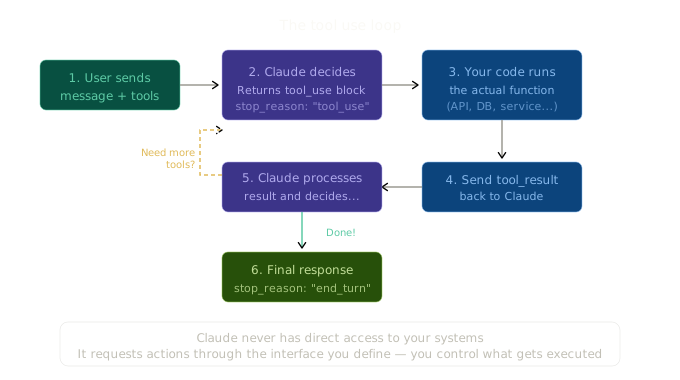
When Claude receives a message from a user, it assesses whether any of the available tools would help answer the question. If it decides to use one, it doesn’t execute anything directly. Instead, it responds with a structured request saying “I’d like to call this tool with these parameters.” Your code then executes the actual function, and you pass the results back to Claude. Claude uses those results to formulate its final answer (or to decide it needs to call another tool).
This separation is deliberate and important. Claude never has direct access to your systems. It can only request actions through the interface you define. You control what’s available, what gets executed, and what results come back. It’s a contract: Claude decides when and how to use a tool, you decide what happens when it does, this includes how you want to handle security and observability and all other manner of normal expectations of an enterprise system, you are responsible and in control.
There are two categories of tools in the Claude API:
Client tools are tools you define and execute yourself. Claude tells you what it wants to call, you run the function in your own environment, and you return the results. This is the fundamental building block for agentic applications. You can wrap any API, database query, internal service, or business logic as a client tool.
Server tools are tools that Anthropic runs for you. Web search, web fetch, and code execution are the main ones. You specify them in your API request, but you don’t need to implement anything on your side. Anthropic’s servers handle the execution and feed the results back to Claude automatically.
The tool use loop
Let’s make this concrete. Here’s the full lifecycle of a tool use interaction in TypeScript. I’ll start with a simple single-tool example, then build up to something more interesting.
A simple client tool
Say you’re building a system that can look up product information. You define a tool that Claude can call, handle the execution yourself, and feed results back:
import Anthropic from "@anthropic-ai/sdk";

const client = new Anthropic();

// Step 1: Define your tools
const tools: Anthropic.Tool[] = [
  {
    name: "get_product_info",
    description:
      "Look up product details by product ID. Returns name, price, stock level, and category.",
    input_schema: {
      type: "object" as const,
      properties: {
        product_id: {
          type: "string",
          description: "The product ID, e.g. 'PROD-001'",
        },
      },
      required: ["product_id"],
    },
  },
];

// Step 2: Your actual tool implementation
function getProductInfo(productId: string) {
  // In reality this would hit your database or API
  const products: Record<string, object> = {
    "PROD-001": {
      name: "Wireless Keyboard",
      price: 79.99,
      stock: 142,
      category: "Electronics",
    },
    "PROD-002": {
      name: "Standing Desk",
      price: 549.0,
      stock: 23,
      category: "Furniture",
    },
  };
  return products[productId] || { error: "Product not found" };
}

// Step 3: Send the request
const response = await client.messages.create({
  model: "claude-sonnet-4-6",
  max_tokens: 1024,
  tools,
  messages: [
    {
      role: "user",
      content: "What can you tell me about product PROD-001?",
    },
  ],
});

// Step 4: Check if Claude wants to use a tool
if (response.stop_reason === "tool_use") {
  const toolUseBlock = response.content.find(
    (block) => block.type === "tool_use"
  );

  if (toolUseBlock && toolUseBlock.type === "tool_use") {
    // Step 5: Execute the tool
    const result = getProductInfo(
      (toolUseBlock.input as { product_id: string }).product_id
    );

    // Step 6: Send the result back to Claude
    const finalResponse = await client.messages.create({
      model: "claude-sonnet-4-6",
      max_tokens: 1024,
      tools,
      messages: [
        {
          role: "user",
          content: "What can you tell me about product PROD-001?",
        },
        { role: "assistant", content: response.content },
        {
          role: "user",
          content: [
            {
              type: "tool_result",
              tool_use_id: toolUseBlock.id,
              content: JSON.stringify(result),
            },
          ],
        },
      ],
    });

    // Step 7: Claude's final answer, informed by the tool result
    for (const block of finalResponse.content) {
      if (block.type === "text") {
        console.log(block.text);
      }
    }
  }
}
Its a simple loop really: you send a message, Claude responds with a tool call, you execute it and return the result, Claude formulates its answer. That’s the fundamental loop. Every tool use interaction, no matter how complex, follows this pattern.
A few things worth noting. The stop_reason of "tool_use" is your signal that Claude wants to call a tool rather than respond directly. The tool_use_id links the result back to the specific tool call, this matters when Claude calls multiple tools. And the full conversation history (including Claude’s tool call and your result) gets sent back each time, so Claude has the full context.
The agentic loop
In practice, Claude often needs to call multiple tools to answer a question. Maybe it needs to look something up, think about it, then look something else up. For this you need a loop:
import Anthropic from "@anthropic-ai/sdk";

const client = new Anthropic();

type Message = Anthropic.MessageParam;

async function agentLoop(userMessage: string, tools: Anthropic.Tool[]) {
  const messages: Message[] = [{ role: "user", content: userMessage }];

  while (true) {
    const response = await client.messages.create({
      model: "claude-sonnet-4-6",
      max_tokens: 4096,
      tools,
      messages,
    });

    // Add Claude's response to the conversation
    messages.push({ role: "assistant", content: response.content });

    // If Claude is done (no more tool calls), return the final text
    if (response.stop_reason === "end_turn") {
      const textBlocks = response.content.filter(
        (block) => block.type === "text"
      );
      return textBlocks.map((b) => (b as { text: string }).text).join("\n");
    }

    // If Claude wants to use tools, execute them all
    if (response.stop_reason === "tool_use") {
      const toolResults: Anthropic.ToolResultBlockParam[] = [];

      for (const block of response.content) {
        if (block.type === "tool_use") {
          console.log(`Calling tool: ${block.name}`, block.input);
          const result = await executeTool(block.name, block.input);
          toolResults.push({
            type: "tool_result",
            tool_use_id: block.id,
            content: JSON.stringify(result),
          });
        }
      }

      // Send all results back to Claude
      messages.push({ role: "user", content: toolResults });
    }
  }
}

async function executeTool(name: string, input: unknown): Promise<unknown> {
  // Route to your actual implementations
  switch (name) {
    case "get_product_info":
      return getProductInfo((input as { product_id: string }).product_id);
    case "check_inventory":
      return checkInventory((input as { product_id: string }).product_id);
    // ... other tools
    default:
      return { error: `Unknown tool: ${name}` };
  }
}
This agentLoop function keeps going until Claude signals it’s done (stop_reason: "end_turn"). Each iteration, it collects all tool calls Claude wants to make, executes them, and sends the results back. Claude might go around this loop once or several times depending on the complexity of the task.
Worth noting that Anthropic also provides a tool runner in the SDK that handles this loop for you. If you want to skip writing the boilerplate, it’s worth looking at. But understanding the manual loop is important because you’ll inevitably need to customise it.
Defining good tools
Here’s something I’ve learned the hard way: the quality of your tool definitions matters as much as the quality of your tool implementations. Claude decides when and how to use a tool based almost entirely on the name, description, and input_schema you provide. If your description is vague, Claude will either misuse the tool or skip it when it should use it.
Some practical guidance:
Be specific in descriptions. “Get weather” is worse than “Get the current weather conditions for a given city, including temperature in Celsius, humidity percentage, and a short text description of conditions (e.g. ‘partly cloudy’).” Claude uses these descriptions to decide when a tool is relevant and what to expect back.
Describe your parameters well. Don’t just say location: string. Say location: "The city and country, e.g. 'Brisbane, Australia'. Use the English name for the city." The more Claude knows about what format you expect, the better its tool calls will be.
Use strict: true for production systems. This is the Structured Outputs feature, which guarantees that Claude’s tool call inputs conform exactly to your JSON schema. No missing fields, no wrong types. Without it, Claude usually gets the schema right, but “usually” isn’t good enough when a malformed input could crash your production system.
const tool: Anthropic.Tool = {
  name: "create_order",
  description: "Create a new customer order",
  strict: true, // Guarantees schema conformance
  input_schema: {
    type: "object" as const,
    properties: {
      customer_id: { type: "string", description: "Customer ID" },
      items: {
        type: "array",
        items: {
          type: "object",
          properties: {
            product_id: { type: "string" },
            quantity: { type: "integer" },
          },
          required: ["product_id", "quantity"],
        },
      },
    },
    required: ["customer_id", "items"],
  },
};
Keep tool counts manageable. Each tool definition eats into your context window. A handful of well-defined tools is usually better than dozens of poorly defined ones. If you do need hundreds of tools (say, you’re connecting multiple MCP servers), look at tool search, which lets Claude dynamically discover and load tools on demand rather than cramming them all into context upfront.
Server-side tools: the ones Anthropic runs for you
These are powerful and underappreciated. You specify them in your request, and Anthropic handles everything. No implementation required on your side.
Web search
Gives Claude access to real-time web content. Claude automatically generates search queries, processes results, and cites sources. The implementation is simple:
const response = await client.messages.create({
  model: "claude-sonnet-4-6",
  max_tokens: 4096,
  tools: [
    {
      type: "web_search_20250305",
      name: "web_search",
      max_uses: 5, // limit searches per request
    },
  ],
  messages: [
    {
      role: "user",
      content: "What were the major AI announcements this week?",
    },
  ],
});
That’s it. Claude decides when to search, formulates the query, processes the results, and weaves them into its response with citations. The response includes server_tool_use and web_search_tool_result blocks alongside Claude’s text, so you can see exactly what it searched for and what it found.
The latest version (web_search_20260209) has a neat trick: if you also enable code execution, Claude can write code to dynamically filter search results before they hit its context window, keeping only what’s relevant. This is a big deal for complex research queries where raw search results would be noisy.
Web search is billed per search performed (check the pricing page for current rates), but it’s reasonably affordable for most use cases.
Web fetch
Pulls the full content of a specific URL. Useful when you already know what page you want Claude to read:
const response = await client.messages.create({
  model: "claude-sonnet-4-6",
  max_tokens: 4096,
  tools: [
    {
      type: "web_fetch_20250910",
      name: "web_fetch",
    },
  ],
  messages: [
    {
      role: "user",
      content:
        "Read https://example.com/quarterly-report and summarise the key findings.",
    },
  ],
});
Code execution
This one’s really interesting. Claude can write and run Python code in a sandboxed environment on Anthropic’s servers. It’s great for data analysis, calculations, generating visualisations, and processing files:
const response = await client.messages.create({
  model: "claude-sonnet-4-6",
  max_tokens: 4096,
  tools: [
    {
      type: "code_execution_20250825",
      name: "code_execution",
    },
  ],
  messages: [
    {
      role: "user",
      content:
        "Calculate the compound annual growth rate if revenue went from $2.3M to $4.1M over 3 years.",
    },
  ],
});
Claude writes the Python code, executes it, gets the result, and uses it in its response. You can even upload files via the Files API and have Claude process them with code execution, for example analysing a CSV or generating charts from a dataset.
One nice pricing detail: if you’re already using web search or web fetch, code execution is free on top of that (no additional charges beyond normal token costs).
Parallel and sequential tool calls
Claude doesn’t just call tools one at a time. It can request multiple tools in a single response, which your code should execute in parallel and return together:
// Claude might respond with multiple tool_use blocks at once
// e.g., checking weather in three cities simultaneously

for (const block of response.content) {
  if (block.type === "tool_use") {
    // block.name might be "get_weather" three times
    // with different inputs: "Sydney", "Melbourne", "Brisbane"
    // Execute all of them and return all results
  }
}
This is parallel tool use, Claude asks for everything it needs upfront when the calls are independent of each other. It saves round trips and reduces latency.
Sequential tool use is the other pattern, where Claude uses the result of one tool to decide what to call next. This happens naturally through the agentic loop: Claude calls tool A, gets the result, thinks about it, then calls tool B based on what it learned. The investment analysis example below demonstrates this.
Tool use + Extended Thinking
Here’s where Part 1 and Part 2 of this series connect, and where things get genuinely powerful.
When you combine tools with adaptive thinking, Claude can reason between tool calls. This is called interleaved thinking, and it means Claude doesn’t just blindly chain tool calls together. It can:
- Call a tool, examine the results, and think about what they mean before deciding what to do next
- Identify gaps in the information it’s gathered and formulate targeted follow-up queries
- Catch inconsistencies across multiple tool results and reason about which source to trust
- Change its strategy mid-task based on what it’s learning
const response = await client.messages.create({
  model: "claude-opus-4-6",
  max_tokens: 16000,
  thinking: {
    type: "adaptive",
  },
  tools: [
    // your tool definitions
  ],
  messages: [
    {
      role: "user",
      content: "Research Acme Corp and assess whether they'd be a good acquisition target.",
    },
  ],
});

// The response may contain interleaved:
// - thinking blocks (Claude reasoning about what to do)
// - tool_use blocks (Claude calling tools)
// - text blocks (Claude's final synthesis)
for (const block of response.content) {
  if (block.type === "thinking") {
    console.log("🧠 Reasoning:", block.thinking);
  } else if (block.type === "tool_use") {
    console.log("🔧 Tool call:", block.name, block.input);
  } else if (block.type === "text") {
    console.log("💬", block.text);
  }
}
The reasoning trace here is valuable. You can see Claude think “the revenue numbers look strong but I should check their debt ratio before drawing conclusions”, then call a financial data tool, then think “interesting, the debt-to-equity ratio is concerning but it’s typical for this sector”, then search for industry benchmarks to confirm. That’s not just tool chaining, that’s genuine analytical reasoning with tools as its information sources.
If you’re using adaptive thinking (recommended for Opus 4.6 and Sonnet 4.6), interleaved thinking is enabled automatically. For older models, you need to add the interleaved-thinking-2025-05-14 beta header.
The tool_choice parameter
You can control how Claude interacts with tools using tool_choice:
// Claude decides whether to use tools (default)
tool_choice: { type: "auto" }

// Claude MUST use a tool (any of them)
tool_choice: { type: "any" }

// Claude MUST use this specific tool
tool_choice: { type: "tool", name: "get_product_info" }

// Tools are disabled for this request
tool_choice: { type: "none" }
auto is right for most situations. Use any when you know the user’s request definitely requires a tool call and you want to skip the “should I use a tool?” deliberation. Use the specific tool variant when you’re building a pipeline where Claude’s job is to extract parameters for a known function. Use none when you want Claude to respond using only its own knowledge, even though tools are defined.
One important caveat: if you’re using extended thinking, only auto and none are supported. The any and specific tool options force tool use, which is incompatible with the thinking flow.
Trade-offs and gotchas
Honest section. Here’s what to watch out for.
Tool definitions eat tokens. Every tool you define gets injected into the system prompt. The Anthropic docs show this adds roughly 346 tokens of overhead just for having tool use enabled, plus whatever your actual tool definitions cost. A five-server MCP setup can easily consume 55,000+ tokens in tool definitions before Claude reads a single message. Be intentional about which tools you expose per request.
The pause_turn stop reason. Server-side tools (web search, code execution) run in a loop on Anthropic’s servers, with a default limit of 10 iterations. If Claude hits this limit, the API returns stop_reason: "pause_turn" instead of "end_turn". You need to handle this by sending the response back to continue the conversation. It’s not an error, just Claude saying “I’m not done yet.”
if (response.stop_reason === "pause_turn") {
  // Continue the conversation so Claude can finish
  const continuation = await client.messages.create({
    model: "claude-sonnet-4-6",
    max_tokens: 4096,
    tools,
    messages: [
      ...previousMessages,
      { role: "assistant", content: response.content },
    ],
  });
}
Latency from the multi-turn loop. Every tool call adds a round trip: Claude’s request, your execution, your result, Claude’s processing. For a task that requires three sequential tool calls, you’re looking at three full API round trips plus whatever your tool execution takes. This is why parallel tool calls matter, and why for really complex multi-tool workflows, you might want to look at programmatic tool calling, where Claude writes code that calls your tools from within a code execution sandbox, reducing round trips significantly.
Tool descriptions are a prompt engineering problem. If Claude isn’t using your tools when it should, or is using them incorrectly, the fix is almost always in the tool description, not the code. Treat tool definitions with the same care you’d treat a system prompt. Test them, iterate on them, and be specific.
What this means for what you’re building
Tool use is the primitive that turns language models into agents. Without it, Claude is a (very smart) conversation partner. With it, Claude can look things up, check facts, run calculations, query databases, hit APIs, and take actions in the real world, all within the flow of a single interaction.
The broader ecosystem is accelerating this. The Model Context Protocol (MCP) is emerging as a standard for connecting AI models to external services, and Anthropic has built an MCP connector directly into the Messages API so you can connect to remote MCP servers without building a client yourself. Companies like Notion, Slack, GitHub, and many others are shipping MCP servers, which means the set of things Claude can interact with is growing rapidly.
I’ve been watching this space from the perspective of someone who’s building a product on top of these APIs, and the pace at which the “what’s possible” boundary is expanding is genuinely remarkable. A year ago, you’d need a dedicated team to build what a single developer can now wire together with tool definitions and an agentic loop.
Next in this series: Structured Outputs, how to guarantee that Claude’s responses conform to an exact schema, and why that matters more than you think when you’re building real integrations.
If you’re building with this stuff or just curious about it, I’d love to hear what you think. You can find me at robcost.com or reach out on LinkedIn.
References & further reading
- Tool use overview, Claude API docs, The main reference for tool use, including client and server tool patterns
- How to implement tool use, Detailed implementation guide with the tool runner and manual loop
- Web search tool, Server-side web search with citations and dynamic filtering
- Code execution tool, Sandboxed Python execution for data analysis
- Programmatic tool calling, Advanced pattern for reducing latency in multi-tool workflows
- Advanced tool use (Anthropic engineering blog), Deep dive on tool search, programmatic calling, and scaling to hundreds of tools
- Structured Outputs, Guaranteed schema conformance for tool inputs with
strict: true - Model Context Protocol, The emerging standard for connecting AI models to external services