Making AI Speak Your Language
Part 3 of a series on Claude API features for builders
In Part 1 we gave Claude space to think. In Part 2 we gave it the ability to act. Both are impressive, but there’s a fundamental problem lurking beneath both capabilities that anyone who’s tried to build a real system on top of an LLM has encountered… the output can be a little unpredictable. (which is part of the point of LLMs right!)
Ask Claude to extract customer data from an email and return it as JSON, and most of the time you’ll get valid JSON. Most of the time. But “most of the time” isn’t good enough when that JSON is feeding into your CRM, your database, or your billing system. One malformed response, one missing field, one string where you expected a number, and your pipeline breaks. Your JSON.parse() throws an error. Your downstream system crashes. Your on-call engineer gets a 3am page. No one wants that page.
Dealing with the gap between “works in a demo” and “works in production” can be quite a journey. And a huge chunk of that gap comes down to one thing: the AI doesn’t reliably produce output in the exact format your systems expect.
Structured Outputs is Anthropic’s solution to this problem, and it’s arguably the most important feature for anyone doing enterprise-level integrations and moving from prototype to production.
The problem: AI output is text, your systems expect structure
Language models generate text. That’s what they do. Even when you ask for JSON, what you’re really doing is asking the model to generate a string that happens to be valid JSON. There’s no guarantee baked into the generation process.
Prompt engineering can get you a long way. Adding “respond only with valid JSON” to your prompt works surprisingly often. But it still fails in edge cases: complex nested structures, long responses that get cut off, unusual input that confuses the model. And when you’re processing thousands of requests a day, “works 99% of the time” means dozens of failures… hardly enterprise-y.
Before Structured Outputs, the standard approach was defensive: try to parse the response, catch errors, retry with a more insistent prompt, maybe try to extract JSON from a partially valid response. It works, but it’s ugly, it’s slow (retries cost money and time), and it’s fragile.
What are Structured Outputs?
Structured Outputs guarantee that Claude’s response conforms to a JSON schema you define. Not “usually conforms.” Not “conforms if you prompt it right.” Guarantees.
It works through a technique called constrained decoding. When you provide a schema, Claude compiles it into a grammar that constrains its token generation. At every step of the generation process, only tokens that would produce valid output according to your schema are allowed. It’s not post-processing or validation after the fact, it’s built into the generation itself.
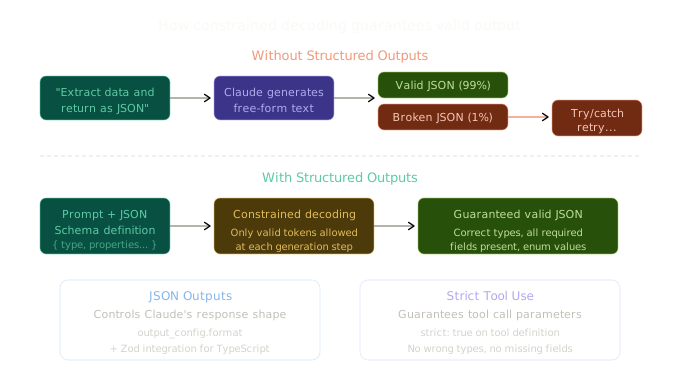
There are two flavours, and they solve different problems:
JSON Outputs (output_config.format) control the shape of Claude’s actual response. When you need Claude to return data in a specific structure, like extracting entities from text or formatting an analysis report, this is what you use.
Strict Tool Use (strict: true on a tool definition) guarantees that when Claude calls one of your tools (from Part 2), the parameters it passes will conform exactly to your input schema. No wrong types, no missing required fields, no surprises.
You can use them independently or together. Let’s look at each.
JSON Outputs: controlling Claude’s response format
Here’s the simplest possible example. Say you want to extract contact information from unstructured text:
import Anthropic from "@anthropic-ai/sdk";

const client = new Anthropic();

const response = await client.messages.create({
  model: "claude-sonnet-4-6",
  max_tokens: 1024,
  messages: [
    {
      role: "user",
      content:
        "Extract the key information from this email: Hi there, I'm Sarah Chen (sarah.chen@acmecorp.com), VP of Engineering at Acme Corp. We're evaluating AI platforms for our customer support team of 200 agents. Would love to schedule a call next week.",
    },
  ],
  output_config: {
    format: {
      type: "json_schema",
      schema: {
        type: "object",
        properties: {
          name: { type: "string" },
          email: { type: "string" },
          title: { type: "string" },
          company: { type: "string" },
          team_size: { type: "integer" },
          use_case: { type: "string" },
          meeting_requested: { type: "boolean" },
        },
        required: [
          "name",
          "email",
          "title",
          "company",
          "team_size",
          "use_case",
          "meeting_requested",
        ],
        additionalProperties: false,
      },
    },
  },
});

// This is GUARANTEED to be valid JSON matching your schema
const data = JSON.parse(response.content[0].type === "text" ? response.content[0].text : "");
console.log(data);
// {
//   name: "Sarah Chen",
//   email: "sarah.chen@acmecorp.com",
//   title: "VP of Engineering",
//   company: "Acme Corp",
//   team_size: 200,
//   use_case: "customer support",
//   meeting_requested: true
// }
The key addition is the output_config.format parameter. You define a standard JSON schema describing the structure you want, and Claude’s response will always match it. That JSON.parse() call will never throw. The team_size will always be an integer, not a string. The meeting_requested will always be a boolean, not “yes” or “true” as a string.
This might seem like a small thing, but if you’ve ever built a data pipeline that consumes LLM output, you know it changes everything. No more try/catch/retry loops. No more regex-based JSON extraction from partially valid responses. No more “it works in testing but breaks in production” conversations.
Using Zod for type safety in TypeScript
If you’re working in TypeScript, you probably don’t want to write raw JSON schemas by hand. The SDK integrates with Zod, so you can define your schema using familiar TypeScript-native tools:
import Anthropic from "@anthropic-ai/sdk";
import { zodOutputFormat } from "@anthropic-ai/sdk/helpers/zod";
import { z } from "zod";

const client = new Anthropic();

const ContactSchema = z.object({
  name: z.string(),
  email: z.string().email(),
  title: z.string(),
  company: z.string(),
  team_size: z.number().int(),
  use_case: z.string(),
  meeting_requested: z.boolean(),
});

const response = await client.messages.create({
  model: "claude-sonnet-4-6",
  max_tokens: 1024,
  messages: [
    {
      role: "user",
      content: "Extract the key information from this email: ...",
    },
  ],
  ...zodOutputFormat(ContactSchema, { name: "contact_info" }),
});
The SDK handles the schema transformation automatically. It strips unsupported constraints (like .email() validation on the string), adds them to field descriptions so Claude still knows what’s expected, and validates the response against the full Zod schema after parsing. You get the best of both worlds: Claude respects the structure, and your code gets full type safety.
Strict tool use: guaranteed parameters for your functions
This is the other half of Structured Outputs, and it connects directly to Part 2’s discussion of tool use. When Claude calls one of your tools, it generates the input parameters. Without strict: true, Claude usually gets this right, but “usually” is the enemy of production reliability.
Consider a booking system:
const tools: Anthropic.Tool[] = [
  {
    name: "book_flight",
    description: "Book a flight for a customer",
    strict: true, // This is the magic line
    input_schema: {
      type: "object" as const,
      properties: {
        origin: {
          type: "string",
          description: "IATA airport code, e.g. 'SYD'",
        },
        destination: {
          type: "string",
          description: "IATA airport code, e.g. 'MEL'",
        },
        date: {
          type: "string",
          description: "Travel date in YYYY-MM-DD format",
        },
        passengers: {
          type: "integer",
          description: "Number of passengers",
        },
        cabin_class: {
          type: "string",
          enum: ["economy", "premium_economy", "business", "first"],
        },
      },
      required: [
        "origin",
        "destination",
        "date",
        "passengers",
        "cabin_class",
      ],
      additionalProperties: false,
    },
  },
];
Without strict: true, Claude might pass passengers: "2" (string instead of integer), or cabin_class: "Economy" (wrong case, not in the enum), or omit cabin_class entirely. Your function would need to handle all these edge cases defensively. With strict: true, the passengers field is guaranteed to be an integer, cabin_class is guaranteed to be one of the enum values, and all required fields will be present. Your function can trust its inputs completely.
The strict flag also validates the tool name. Claude can’t hallucinate a tool that doesn’t exist.
Real-world use cases
Let me walk through a few patterns where Structured Outputs make a real difference.
Data extraction at scale
This is probably the most common use case. You’ve got a pile of unstructured text, emails, support tickets, documents, reviews, and you need to pull structured data out of them. Without Structured Outputs, you’d prompt Claude to return JSON and hope for the best. With them, you define your schema once and process thousands of documents with confidence.
const SupportTicketSchema = {
  type: "object" as const,
  properties: {
    customer_id: { type: "string" },
    issue_category: {
      type: "string",
      enum: ["billing", "technical", "account", "feature_request", "other"],
    },
    severity: {
      type: "string",
      enum: ["low", "medium", "high", "critical"],
    },
    summary: { type: "string" },
    requires_escalation: { type: "boolean" },
    suggested_department: { type: "string" },
  },
  required: [
    "customer_id",
    "issue_category",
    "severity",
    "summary",
    "requires_escalation",
    "suggested_department",
  ],
  additionalProperties: false,
};
Feed this schema with a batch of raw support emails and you get perfectly structured data ready to route into your ticketing system, trigger escalation workflows, or populate dashboards. Every single response will have the right shape.
Classification with confidence
Enums in your schema become a powerful classification tool. Instead of Claude responding with free-form text like “This seems like it might be a billing issue”, you get a guaranteed value from a fixed set:
const schema = {
  type: "object" as const,
  properties: {
    intent: {
      type: "string",
      enum: ["purchase", "refund", "inquiry", "complaint", "compliment"],
    },
    sentiment: {
      type: "string",
      enum: ["positive", "neutral", "negative"],
    },
    language: {
      type: "string",
      enum: ["en", "es", "fr", "de", "ja", "zh", "other"],
    },
  },
  required: ["intent", "sentiment", "language"],
  additionalProperties: false,
};
No need to normalise fuzzy text outputs. Your downstream systems can switch on these values directly.
Combining both features
The real power shows up when you use JSON Outputs and Strict Tool Use together. Imagine an agentic workflow where Claude needs to call tools with guaranteed parameters and return a final structured report:
const response = await client.messages.create({
  model: "claude-sonnet-4-6",
  max_tokens: 4096,
  tools: [
    {
      name: "query_database",
      description: "Query the customer database",
      strict: true,
      input_schema: {
        type: "object" as const,
        properties: {
          query: { type: "string", description: "SQL query to execute" },
        },
        required: ["query"],
        additionalProperties: false,
      },
    },
  ],
  output_config: {
    format: {
      type: "json_schema",
      schema: {
        type: "object",
        properties: {
          analysis: { type: "string" },
          key_findings: {
            type: "array",
            items: { type: "string" },
          },
          recommendation: { type: "string" },
          confidence: {
            type: "string",
            enum: ["low", "medium", "high"],
          },
        },
        required: [
          "analysis",
          "key_findings",
          "recommendation",
          "confidence",
        ],
        additionalProperties: false,
      },
    },
  },
  messages: [
    {
      role: "user",
      content: "Analyse our Q4 customer churn data and provide recommendations.",
    },
  ],
});
Claude’s tool calls have guaranteed valid SQL parameters. Its final response has a guaranteed structure with typed findings, a recommendation, and a confidence classification. Every piece of the pipeline is type-safe.
Things to know before you build
Schema limitations
Structured Outputs uses standard JSON Schema, but not all of it. The main constraints to be aware of:
- Supported:
type,enum,properties,required,items,anyOf,const,$ref,additionalProperties,pattern(regex) - Not supported:
minimum/maximum,minLength/maxLength,minItems/maxItems,uniqueItems,format(mostly)
If you’re using the TypeScript SDK with Zod, the SDK handles this automatically, it strips unsupported constraints and adds them to field descriptions so Claude still gets the guidance, then validates the response against the full schema on return. Clever bit of engineering.
Complexity limits
There are practical limits on how complex your schemas can be. The key ones:
- Maximum 20 strict tools per request
- Maximum 24 optional parameters across all strict schemas
- Maximum 16 parameters with union types (
anyOf)
If you’re hitting these, the docs suggest making more parameters required (each optional parameter roughly doubles the grammar’s state space), flattening nested structures, or splitting across multiple requests.
Performance considerations
The first request with a new schema has extra latency while Anthropic compiles the grammar. Subsequent requests with the same schema are faster because the compiled grammar is cached for 24 hours. Changing your schema structure invalidates the cache and triggers recompilation. Changing just the name or description fields does not.
This means that in production, your schemas should be relatively stable. Don’t dynamically generate a new schema per request unless you have to.
Edge cases where guarantees don’t hold
There are two scenarios where Structured Outputs can produce output that doesn’t match your schema:
Safety refusals. If Claude refuses a request for safety reasons, it returns stop_reason: "refusal" and the output won’t match your schema. The refusal takes precedence over schema constraints. You should check for stop_reason before parsing.
Token limits. If the response hits max_tokens before completing, you get a truncated response with stop_reason: "max_tokens". The output will likely be invalid JSON. Set max_tokens generously for structured output requests.
// Always check stop_reason before parsing
if (response.stop_reason === "end_turn") {
  const data = JSON.parse(response.content[0].type === "text" ? response.content[0].text : "");
  // Safe to use data
} else if (response.stop_reason === "refusal") {
  console.log("Claude refused the request");
} else if (response.stop_reason === "max_tokens") {
  console.log("Response was truncated, retry with higher max_tokens");
}
Works with Extended Thinking
A nice detail: the grammar constraint only applies to Claude’s final output, not its thinking blocks. So if you’re combining Structured Outputs with Extended Thinking from Part 1, Claude can think freely and creatively in the thinking phase, then produce perfectly structured output in the response. Best of both worlds.
The bigger picture: from prototype to production
Here’s what I think is the underappreciated story about Structured Outputs. It’s not a flashy feature. It won’t make your demo more impressive. Nobody is going to look at guaranteed JSON schema conformance and say “wow, that’s amazing AI”, but it is the feature that lets you actually ship.
Combined with Extended Thinking (for reasoning quality) and Tool Use (for real-world actions), you now have an AI system that can think deeply, act on the world, and communicate in exact, machine-readable formats. That’s the full stack for building reliable AI-powered systems.
If you’re evaluating whether to move an AI prototype into production, Structured Outputs should be one of the first features you reach for. It won’t fix everything (you still need good prompts, sensible tool definitions, and appropriate guardrails), but it eliminates an entire class of reliability problems that would otherwise eat up months of your engineering team’s time.
Next in this series: I’ll look at how Claude can process PDFs and images, bringing document understanding capabilities into your AI workflows.
If you’re building with this stuff or just curious about it, I’d love to hear what you think. You can find me at robcost.com or reach out on LinkedIn.
References & further reading
- Structured Outputs, Claude API docs, Full documentation including JSON Schema limitations, SDK helpers, and complexity limits
- Tool use overview, How strict tool use connects to the broader tool use system (covered in Part 2)
- Zod schema library, TypeScript-first schema validation, integrates natively with the Anthropic SDK
- JSON Schema specification, The underlying standard that Structured Outputs builds on