Let Claude Run Agent Infrastructure
Part 10 of a series on Claude API features for builders
Over the last nine posts I’ve worked through the Claude API from the ground up: how to make Claude think, act, speak precisely, see, cite its sources, manage its memory, operate cheaply, develop expertise, and run autonomously.
In Part 9, the Agent SDK removed the need to build your own agent loop. But you still had to run the infrastructure: the containers, the sandbox, the tool execution environment. If you wanted a coding agent that could safely run bash commands and write files, you needed somewhere for it to do that, and you needed to manage that somewhere yourself.
Managed Agents removes that last layer. You define what your agent does, Anthropic runs it. The containers, the tool execution, the compaction, the caching, it’s all handled. You send a message, stream the events back, and the agent works autonomously in a cloud container until it’s done.
Four building blocks
Managed Agents is built around four concepts that compose together:
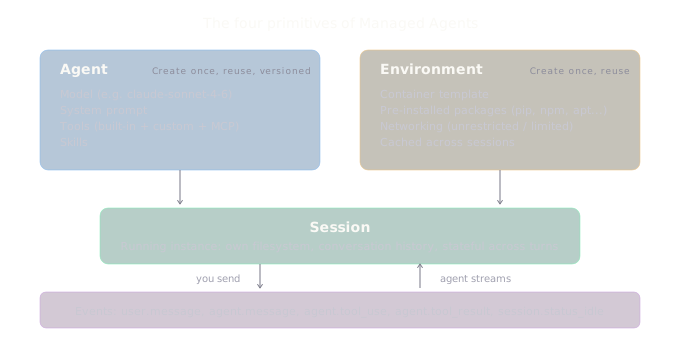
Agent is the reusable configuration: which model to use, the system prompt, which tools are available. You create an agent once and reference it by ID across as many sessions as you need. Agents are versioned, so you can update the config without breaking running sessions.
Environment is the container template. It defines what packages are pre-installed (Python, Node.js, Go, whatever you need), how networking is configured, and what the container looks like before the agent starts working. Like agents, you create it once and reuse it.
Session is a running instance. It combines an agent and an environment into an actual execution context with its own filesystem, conversation history, and state. Think of it as spinning up a fresh dev environment with a specific set of instructions.
Events are how you communicate. You send user events (messages, interrupts, tool results), and the agent streams back events as it works (text, tool calls, tool results, status changes). It’s all server-sent events (SSE), so you can process them in real time.
A complete example
Here’s the full flow in TypeScript. One important detail: Managed Agents uses the standard @anthropic-ai/sdk package with a beta header, not the Agent SDK from Part 9.
import Anthropic from "@anthropic-ai/sdk";

const client = new Anthropic();

// Step 1: Create the agent (reusable config)
const agent = await client.beta.agents.create({
  name: "Data Analyst",
  model: "claude-sonnet-4-6",
  system:
    "You are a data analyst. Write clean Python code, execute it, and explain your findings clearly.",
  tools: [{ type: "agent_toolset_20260401" }],
});

// Step 2: Create the environment (container template)
const environment = await client.beta.environments.create({
  name: "python-analysis",
  config: {
    type: "cloud",
    packages: {
      pip: ["pandas", "numpy", "matplotlib"],
    },
    networking: { type: "unrestricted" },
  },
});

// Step 3: Start a session
const session = await client.beta.sessions.create({
  agent: agent.id,
  environment_id: environment.id,
});

// Step 4: Open the stream, then send a message
const stream = await client.beta.sessions.events.stream(session.id);

await client.beta.sessions.events.send(session.id, {
  events: [
    {
      type: "user.message",
      content: [
        {
          type: "text",
          text: "Download the Iris dataset, run a basic statistical analysis, and create a visualization. Save everything to files.",
        },
      ],
    },
  ],
});

// Step 5: Process events as they arrive
for await (const event of stream) {
  if (event.type === "agent.message") {
    for (const block of event.content) {
      process.stdout.write(block.text);
    }
  } else if (event.type === "agent.tool_use") {
    console.log(`\n[${event.name}]`);
  } else if (event.type === "session.status_idle") {
    console.log("\n\nDone.");
    break;
  }
}
The agent writes Python code, runs it inside the container, checks the output, iterates if something fails, and streams the whole process back to you. You don’t provision anything, manage any sandbox, or implement any tool execution logic. You send a message and watch it work.
Configuring the environment
The environment is where the practical decisions live. Two things matter most: packages and networking.
Packages
You specify packages by their package manager, and they get pre-installed before the agent starts. Supported managers include pip, npm, apt, cargo, gem, and go:
const environment = await client.beta.environments.create({
  name: "fullstack-dev",
  config: {
    type: "cloud",
    packages: {
      pip: ["pandas==2.2.0", "scikit-learn"],
      npm: ["express@4.18.0", "zod"],
      apt: ["ffmpeg"],
    },
    networking: { type: "unrestricted" },
  },
});
You can pin versions or let them default to latest. Packages are cached across sessions that share the same environment, so you’re not reinstalling every time.
Networking
Two modes: unrestricted (full outbound access, the default) and limited (explicit allowlist). For production, you probably want limited:
networking: {
  type: "limited",
  allowed_hosts: ["api.example.com", "registry.npmjs.org"],
  allow_package_managers: true,
  allow_mcp_servers: true,
}
This follows least-privilege: the container can only reach the domains you specify, with optional flags for package registries and MCP server endpoints.
Tools
The agent_toolset_20260401 type enables the full set of built-in tools: bash, file read/write/edit, glob, grep, web search, and web fetch. You can selectively disable tools you don’t want:
tools: [
  {
    type: "agent_toolset_20260401",
    configs: [
      { name: "web_fetch", enabled: false },
      { name: "web_search", enabled: false },
    ],
  },
];
Or flip the default and enable only what you need:
tools: [
  {
    type: "agent_toolset_20260401",
    default_config: { enabled: false },
    configs: [
      { name: "bash", enabled: true },
      { name: "read", enabled: true },
      { name: "write", enabled: true },
    ],
  },
];
Custom tools
You can define your own tools alongside the built-in set. These work like the client-executed tools from Part 2, the agent emits a agent.custom_tool_use event with the tool name and input, your code executes it, and you send the result back as a user.custom_tool_result event:
// Define a custom tool in the agent config
const agent = await client.beta.agents.create({
  name: "Weather Reporter",
  model: "claude-sonnet-4-6",
  tools: [
    { type: "agent_toolset_20260401" },
    {
      type: "custom",
      name: "get_weather",
      description: "Get current weather for a location",
      input_schema: {
        type: "object",
        properties: {
          location: { type: "string", description: "City name" },
        },
        required: ["location"],
      },
    },
  ],
});
When the agent calls your custom tool during a session, you handle the agent.custom_tool_use event, run whatever logic you need, and send the result back. The agent continues from there. This is how you connect Managed Agents to your own systems, databases, APIs, anything you can call from your code.
Managed Agents also supports MCP servers for external tool connections. You configure them in the agent definition, and the container handles the connectivity. If you’re already using MCP in your stack, it works here too.
Steering mid-execution
One feature I particularly like: you can redirect the agent while it’s working. Send a user.message event to a running session and Claude adjusts course. Send a user.interrupt event to stop it entirely. This makes Managed Agents feel more like a collaboration than a fire-and-forget job.
// Agent is running, but you want to change direction
await client.beta.sessions.events.send(session.id, {
  events: [
    {
      type: "user.message",
      content: [
        {
          type: "text",
          text: "Actually, use a bar chart instead of a scatter plot.",
        },
      ],
    },
  ],
});
Sessions are also multi-turn. After the agent goes idle, you can send another message and it picks up where it left off with the full context and filesystem state preserved.
When to use what
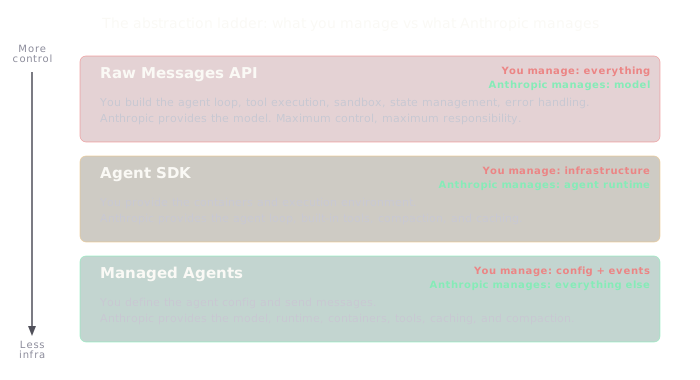
After nine posts of building with the raw API and one post on the Agent SDK, here’s how I think about the three options:
Raw Messages API when you need precise control over every request, you’re building chat-style interfaces, or you need features like Structured Outputs and Citations that work at the message level. You manage everything, and that’s the point.
Agent SDK when you’re building agents that run on your infrastructure. You get the built-in tools and agent loop without building them, but you control the execution environment. Good for local development tools, CI/CD integrations, and applications where the agent needs to operate on your filesystem or within your network.
Managed Agents when you want autonomous execution without managing infrastructure. The agent runs in Anthropic’s cloud, in its own container, with its own filesystem. Good for long-running tasks, async processing, data analysis jobs, and applications where you’d rather not operate a sandbox.
The three aren’t competing. They’re different points on a spectrum of control versus convenience. In GameForge, I use all three levels. The orchestration logic uses the raw API for precise control over the pipeline. The Developer and QA agents run on the Agent SDK because they need local filesystem access and tight control over the build process.
But there’s a piece that would be better on Managed Agents. Right now, GameForge’s QA agent runs locally via the Agent SDK, which means I manage the Playwright container, the browser lifecycle, and the screenshot storage. If I moved QA to Managed Agents, I’d define a QA agent config with Playwright pre-installed in the environment, send it the game URL, and stream back the test results. The container management disappears. The Developer agent probably stays on the Agent SDK because it needs to write to a local project directory that feeds into the build. Hybrid is likely the right answer for most non-trivial systems.
Trade-offs
Beta. Managed Agents requires the managed-agents-2026-04-01 beta header. The API surface is still evolving.
Less control. You don’t manage the agent loop. You can steer and interrupt, but you can’t inject custom logic between tool calls the way you can with the Agent SDK or raw API.
Container cold starts. Provisioning a container takes time. For latency-sensitive, user-facing interactions, the Agent SDK or raw API may be better.
Anthropic’s infrastructure. Your code and data run in Anthropic’s cloud containers. For some organisations, that’s a non-starter regardless of the convenience.
Pricing. Standard token-based pricing applies, but you’re also paying for container compute time. For high-volume workloads, the cost profile is different from the raw API.
The full stack
This is the last post in the series, so it’s worth stepping back. Over ten posts we’ve assembled a complete set of tools for building AI systems:
- Extended Thinking gives Claude space to reason through hard problems.
- Tool Use lets Claude take actions in the real world.
- Structured Outputs guarantees the shape of Claude’s responses.
- Vision lets Claude understand images and documents.
- Citations proves where Claude’s answers came from.
- Context Windows manages Claude’s working memory.
- Batch Processing & Caching makes everything cheaper at scale.
- Agent Skills packages domain expertise for reuse.
- Agent SDK provides a production agent runtime.
- Managed Agents runs agents without infrastructure.
Each feature builds on the ones before it. You can use them independently, but the real value comes from combining them. A Managed Agent that can think deeply, read documents, cite its sources, use domain-specific Skills, and run code in a provisioned container, that’s a genuinely useful system, not a demo.
I started this series because I wanted to see more people sharing what they’re actually building, not just opinions about whether AI will or won’t replace everything. If any of it was useful, or if you’ve been building something with these features, I’d genuinely love to hear about it.
Thanks for following along. You can find me at robcost.com or reach out on LinkedIn.
References & further reading
- Managed Agents overview, Claude API docs, Architecture, core concepts, and when to use Managed Agents
- Managed Agents quickstart, Create your first agent, environment, and session
- Tools, Claude API docs, Built-in and custom tool configuration
- Environments, Claude API docs, Container setup, packages, and networking
- Events and streaming, Claude API docs, SSE event types, streaming, and agent steering