How Much Can AI Remember?
Part 6 of a series on Claude API features for builders
Every feature I’ve covered in this series so far, thinking deeply, using tools, structured outputs, understanding documents, citing sources, they all share something in common. They all consume tokens. And tokens live inside something called the context window.
If you’ve ever had a long conversation with Claude and noticed it starting to “forget” things you mentioned earlier, or if you’ve tried to feed it a huge document and hit a wall, you’ve bumped into context window limits. Understanding how the context window works, and the new tools available for managing it, is one of the most practically important things you can know as someone building with the API.
And with Claude Opus 4.6 and Sonnet 4.6 now offering a 1 million token context window, that’s a lot more room to work with.
What is the context window?
The context window is Claude’s working memory. It’s the total amount of text, code, documents, images, tool definitions, conversation history, and output that Claude can reference when generating a response. Think of it as everything on Claude’s desk at any given moment.
This is fundamentally different from Claude’s training data. Training is what Claude learned (past tense, fixed). The context window is what Claude can see right now, in this specific conversation. It’s ephemeral, it exists only for the duration of the request.
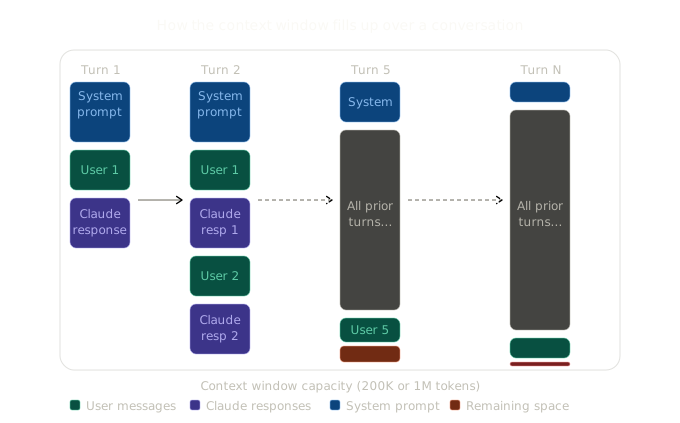
Every API request sends the entire conversation history to Claude. Turn 1 sends your system prompt and the user’s first message. Turn 2 sends the system prompt, the first exchange, and the new message. By turn 10, Claude is receiving all of turns 1-9 plus the new input. The context window fills up linearly with each turn.
This is the key insight that surprises many people new to the API: Claude doesn’t remember between requests. Every single request is a fresh start. The only reason conversations feel continuous is that you’re sending the full history each time. Claude’s “memory” is really just your application re-sending everything.
The 1M token window
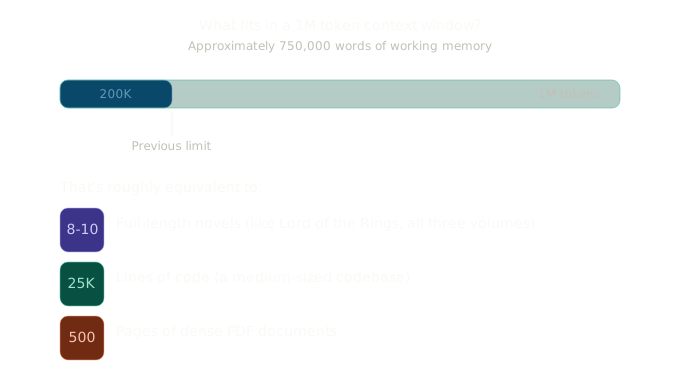
With Claude Opus 4.6 and Sonnet 4.6, the context window is now 1 million tokens. To put that in perspective:
In 2023, I was trying to convince a customer to explore document summarisation for their historical document archive. They had years of documents they wanted indexed and summarised, a quick way to find what mattered without reading everything. The model I was pitching was Google’s BigBird-Pegasus, which at the time felt like a breakthrough because it could handle 4,096 tokens of input (huge right!), that’s roughly 6 pages. I spent weeks figuring out how to chunk their documents into pieces small enough to fit, summarise each chunk separately, then stitch the summaries together (a summary of summaries if you will). It “sort of” worked, it was clunky and the transition from extractive to abstractive summarisation was still not perfect. Three years later, Claude can take in 1 million tokens in a single request. You could feed it that entire archive now and ask a question. Quite some progress in 3 years right?
1 millon tokens is an enormous amount of working memory. You can feed Claude an entire codebase, a full set of legal contracts, or hundreds of pages of research, and still have room for a long conversation about it. The previous standard was 200K tokens (which was already large), so 1M represents a 5x increase. Just imagine how big the window will be in 5 to 10 years from now!
For Sonnet 4.5 and Sonnet 4, you can access 1M tokens by adding the context-1m-2025-08-07 beta header to your requests (available to organisations in usage tier 4+). For Opus 4.6 and Sonnet 4.6, it’s available by default.
import Anthropic from "@anthropic-ai/sdk";

const client = new Anthropic();

// For Opus 4.6 / Sonnet 4.6, 1M is the default
const response = await client.messages.create({
  model: "claude-opus-4-6",
  max_tokens: 8192,
  messages: [
    {
      role: "user",
      content: "Here is an entire codebase... [750K tokens of code] ...Now explain the authentication flow.",
    },
  ],
});

// For older models, add the beta header
const response2 = await client.beta.messages.create({
  model: "claude-sonnet-4-5-20250929",
  max_tokens: 8192,
  betas: ["context-1m-2025-08-07"],
  messages: [
    {
      role: "user",
      content: "...",
    },
  ],
});
More context isn’t automatically better
Here’s something that’s not immediately obvious and that I think is important to understand: a bigger context window doesn’t automatically mean better results. As the amount of context grows, accuracy and recall can degrade, a phenomenon researchers call context rot or forgetting in the middle.
Claude achieves state-of-the-art results on long-context retrieval benchmarks (like MRCR), but even the best models start to lose track of specific details when the context gets very long. It’s like the difference between finding a specific sentence in a one-page memo versus finding it in a 500-page book. Both are possible, but one is harder.
This means curating what’s in context matters just as much as how much fits. Don’t dump everything in just because you can. Be strategic about what context Claude actually needs for the current task. Anthropic’s own engineering blog on context engineering goes into this in detail and is well worth reading.
What happens when you run out of room
In a simple chat application, running out of context means the conversation just stops working. You hit the limit and get an error. But in agentic applications, the problem is more insidious. An agent that’s been running for a while, calling tools, processing results, building up conversation history, can quietly approach the limit and then fail mid-task.
There are three strategies for dealing with this, and they’re not mutually exclusive.
Strategy 1: Compaction (the recommended approach)
Compaction is Anthropic’s server-side solution for long-running conversations and agentic workflows. It’s the recommended approach and it’s elegantly simple: when the conversation gets too long, Claude automatically summarises the older parts, freeing up space for the conversation to continue.
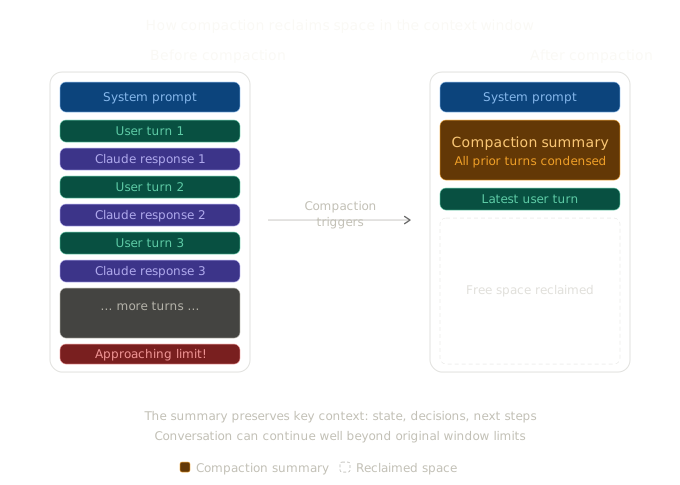
Here’s how you enable it:
import Anthropic from "@anthropic-ai/sdk";

const client = new Anthropic();

const response = await client.beta.messages.create({
  model: "claude-opus-4-6",
  max_tokens: 4096,
  betas: ["compact-2026-01-12"],
  messages: conversationHistory,
  context_management: {
    edits: [
      {
        type: "compact_20260112",
        trigger: {
          type: "input_tokens",
          value: 150000, // Compact when input exceeds 150K tokens
        },
      },
    ],
  },
});
When the input tokens exceed the trigger threshold (default 150K, minimum 50K), the API automatically summarises the conversation and returns a compaction block. On subsequent requests, everything before that compaction block is dropped and replaced by the summary. The conversation continues from the summary with all the free space reclaimed.
The default summarisation prompt focuses on preserving state, next steps, and learnings, but you can provide custom instructions:
context_management: {
  edits: [
    {
      type: "compact_20260112",
      instructions:
        "Focus on preserving code snippets, variable names, and technical decisions. Include any file paths that were discussed.",
    },
  ],
}
This is particularly useful for coding agents where losing track of variable names or file paths would be catastrophic.
Pausing after compaction
For more control, you can tell the API to pause after generating the summary. This lets you inspect the summary, add additional context, or even inject your own messages before the conversation continues:
context_management: {
  edits: [
    {
      type: "compact_20260112",
      pause_after_compaction: true,
    },
  ],
}

// When compaction triggers, response.stop_reason === "compaction"
// You can then add messages and continue
if (response.stop_reason === "compaction") {
  messages.push({ role: "assistant", content: response.content });
  messages.push({
    role: "user",
    content: "Also, remember that we decided to use PostgreSQL, not MySQL.",
  });
  // Continue with another request...
}
Token budgeting with compaction
For long-running agents, you can combine pause_after_compaction with a compaction counter to estimate total token consumption and gracefully wrap up when you hit a budget:
const TRIGGER = 100_000;
const BUDGET = 3_000_000;
let compactionCount = 0;

// In your agent loop...
if (response.stop_reason === "compaction") {
  compactionCount++;
  if (compactionCount * TRIGGER >= BUDGET) {
    // Ask the agent to wrap up
    messages.push({
      role: "user",
      content: "Please wrap up your current work and summarise the final state.",
    });
  }
}
Compaction is currently in beta, available for Opus 4.6 via the compact-2026-01-12 beta header.
Strategy 2: Context editing
Context editing offers more targeted strategies for specific scenarios:
Tool result clearing removes old tool results from the context when approaching the token limit. This is useful in agentic workflows where Claude calls many tools and the accumulated results eat up space. The tool calls themselves are preserved (so Claude remembers what it did), but the raw result data is cleared.
Thinking block clearing manages extended thinking blocks. As we covered in Part 1, thinking blocks from previous turns are normally stripped automatically. But in tool-use scenarios within a single turn, thinking blocks must be preserved. Thinking block clearing handles this automatically.
These are more surgical tools for specific situations. For most use cases, compaction is the simpler and more effective solution.
Strategy 3: Context awareness
This isn’t a management strategy you implement, it’s a capability built into the newer models. Claude Sonnet 4.6, Sonnet 4.5, and Haiku 4.5 have context awareness, which means they can track their remaining token budget throughout a conversation.
At the start of a conversation, Claude receives information about its total window. After each tool call, it receives an update on remaining capacity. This lets Claude make intelligent decisions about how to use its remaining space, whether to be more concise, when to wrap up a long task, and how to prioritise information.
The Anthropic docs compare it to a cooking show clock. Without context awareness, Claude is competing without knowing how much time is left. With it, Claude can pace itself appropriately.
Extended thinking and the context window
One important nuance from Part 1 that’s worth revisiting in this context: thinking tokens count toward the context window during the turn they’re generated, but they’re automatically stripped from subsequent turns. You don’t pay the context window cost for previous thinking, only for the current turn’s thinking.
This is surprisingly efficient. Even if Claude uses 10,000 thinking tokens in turn 1, those tokens don’t carry forward to turn 2. The thinking informed Claude’s response, and the response is what persists.
However, there’s a catch during tool-use loops. Within a single assistant turn (where Claude is calling tools and waiting for results), thinking blocks must be preserved and passed back. It’s only when the turn fully completes that old thinking gets stripped. The API handles most of this automatically, but it’s worth understanding if you’re building complex agentic workflows.
Practical guidance
After working with these features across different projects, here’s what I’ve found works:
For chat applications: Enable compaction with a trigger around 150K tokens. Set the default summarisation instructions unless you have specific context that needs preserving. Most of the time, the defaults work well.
For coding agents: Use compaction with custom instructions that emphasise preserving file paths, variable names, function signatures, and technical decisions. Set pause_after_compaction: true so you can verify the summary hasn’t lost critical state.
For document analysis: Don’t rely on compaction. Instead, be strategic about which documents or sections you include in each request. If you’re analysing a 200-page PDF, consider splitting it and asking focused questions about specific sections rather than cramming everything in at once.
For long-running agents with tools: Combine compaction with tool result clearing. Agent tool calls can generate enormous amounts of context (web search results, code execution output, database query results), and clearing old tool results while keeping the compaction summary is often the right balance.
Monitor your usage. The usage object in every API response tells you how many input and output tokens you used. Track this over time. If you’re consistently hitting compaction triggers, you might need to restructure your prompts to be more concise, or pre-process your inputs to include only what’s relevant.
The bigger picture
Context management might seem like a plumbing concern, something you deal with after you’ve built the exciting parts. But it’s actually fundamental to building AI systems that work reliably over time. Every feature in this series operates within the context window: thinking tokens, tool definitions, tool results, documents, images, conversation history. Understanding how they all fit together, and what to do when they don’t, is what separates a demo from a production system.
With 1M tokens now available and compaction handling the overflow, the constraints are much more forgiving than they were even a year ago. But “more forgiving” doesn’t mean “infinite.” The developers who build the best AI products will be the ones who think carefully about what goes into context and why, not just how much they can fit.
Next in this series: Batch Processing and Prompt Caching, the features that make everything we’ve covered so far cheaper and faster at scale.
If you’re building with this stuff or just curious about it, I’d love to hear what you think. You can find me at robcost.com or reach out on LinkedIn.
References & further reading
- Context windows, Claude API docs, Full documentation on context window sizes, token counting, and context awareness
- Compaction, Claude API docs, Server-side context summarisation with custom instructions and pause controls
- Context editing, Claude API docs, Tool result clearing and thinking block clearing strategies
- Effective context engineering (Anthropic engineering blog), Deep dive on why what’s in context matters more than how much fits