How AI Can Cite Its Sources
Part 5 of a series on Claude API features for builders
There’s a question that comes up in every conversation about putting AI into production. It doesn’t matter who’s asking the question, everyone is wary of hallucinations (or confabulations, data-driven fabrications, factual inconsistencies, misinformation, or what ever else people choose to call it). The question is always some version of: “But how do I know it’s not making things up?”
It’s a fair question, we all know language models generate text probabilistically, autoregressively generating tokens. They can produce confident, articulate, entirely wrong answers. In casual use this is an annoyance. In a business context, especially anything involving legal, financial, medical, or compliance information, it’s a genuine risk. And “trust me bro, it’s usually right” is not a viable answer when you’re building systems that people depend on.
In the previous posts we’ve covered how Claude can think deeply, take actions, produce structured output, and understand documents and images. But all of those capabilities are diminished if you can’t verify where the answers came from. Citations help to close that gap.
The problem with AI-generated references
Before the Citations API existed, the standard approach to getting source references from an LLM was to prompt it: “Please include citations for your claims.” This sort of works, but it has serious problems.
First, the citations are often wrong. The model might reference a document you provided but point to the wrong section, or paraphrase a passage and present it as a direct quote when it isn’t. Second, there’s no guarantee of consistency. Sometimes you get citations, sometimes you don’t. The format varies between responses. And third, building the post-processing to validate these free-form citations is a significant engineering effort, you end up writing complex string-matching logic to check whether the quoted text actually appears in the source. The Citations API handles the difficult parts for you.
What Citations actually does
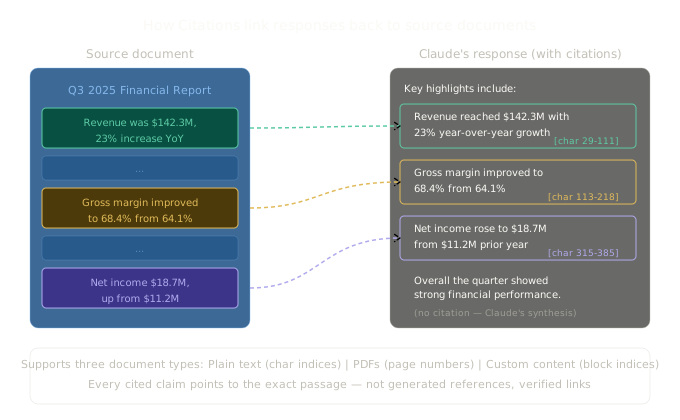
When you enable citations on a document, Claude’s response changes shape. Instead of returning a single text block, the response comes back as a sequence of text blocks, where some blocks include a citations array pointing to exact locations in your source documents. Claude isn’t generating free-form references. It’s pointing back to specific sentences, character ranges, or page numbers in the documents you provided.
Here’s what it looks like in practice:
import Anthropic from "@anthropic-ai/sdk";

const client = new Anthropic();

const response = await client.messages.create({
  model: "claude-sonnet-4-6",
  max_tokens: 4096,
  messages: [
    {
      role: "user",
      content: [
        {
          type: "document",
          source: {
            type: "text",
            media_type: "text/plain",
            data: `Q3 2025 Financial Summary

Revenue for Q3 2025 was $142.3 million, representing a 23% increase year-over-year.
Gross margin improved to 68.4%, up from 64.1% in Q3 2024, driven primarily by
operational efficiencies in the cloud services division. Operating expenses increased
by 12% to $78.2 million, largely due to investments in R&D and sales headcount.
Net income was $18.7 million, compared to $11.2 million in the prior year quarter.
The company ended the quarter with $234 million in cash and equivalents.`,
          },
          title: "Q3 2025 Quarterly Report",
          citations: { enabled: true },
        },
        {
          type: "text",
          text: "What were the key financial highlights this quarter?",
        },
      ],
    },
  ],
});

// The response is now multiple text blocks, some with citations
for (const block of response.content) {
  if (block.type === "text") {
    console.log(block.text);
    if ("citations" in block && block.citations) {
      for (const citation of block.citations) {
        console.log(`  📎 Source: "${citation.cited_text}"`);
      }
    }
  }
}
The response structure looks something like this:
{
  "content": [
    {
      "type": "text",
      "text": "The key financial highlights for Q3 2025 include: "
    },
    {
      "type": "text",
      "text": "revenue reaching $142.3 million with 23% year-over-year growth",
      "citations": [
        {
          "type": "char_location",
          "cited_text": "Revenue for Q3 2025 was $142.3 million, representing a 23% increase year-over-year.",
          "document_index": 0,
          "document_title": "Q3 2025 Quarterly Report",
          "start_char_index": 29,
          "end_char_index": 111
        }
      ]
    },
    {
      "type": "text",
      "text": ", along with "
    },
    {
      "type": "text",
      "text": "gross margin improvement to 68.4% from 64.1%",
      "citations": [
        {
          "type": "char_location",
          "cited_text": "Gross margin improved to 68.4%, up from 64.1% in Q3 2024...",
          "document_index": 0,
          "document_title": "Q3 2025 Quarterly Report",
          "start_char_index": 113,
          "end_char_index": 218
        }
      ]
    }
  ]
}
Every claim Claude makes that’s derived from the source document gets a citation pointing to the exact text. The cited_text field contains the actual passage from the source, and the character indices let you highlight the exact location in the original document. This isn’t Claude paraphrasing and hoping, it’s a verified reference to content that actually exists in your document.
The three document types
Citations work with three types of source documents, each with different citation formats:
Plain text documents
You provide raw text, and citations reference character index ranges. This is the simplest to work with and what I showed in the example above.
{
  type: "document",
  source: {
    type: "text",
    media_type: "text/plain",
    data: "Your document content here...",
  },
  title: "Document Title",           // optional
  context: "Background information",  // optional, not cited from
  citations: { enabled: true },
}
The context field is a nice detail. You can provide background information about the document (what it is, when it was written, how to interpret it) and Claude will use that context to inform its responses, but it won’t cite from it. This lets you give Claude guidance without polluting the citation sources.
PDF documents
PDFs return page-number-based citations rather than character indices, which makes more sense for multi-page documents:
{
  type: "document",
  source: {
    type: "base64",
    media_type: "application/pdf",
    data: pdfBase64Data,
  },
  title: "Annual Report 2025",
  citations: { enabled: true },
}
Citation responses for PDFs include start_page_number and end_page_number fields (1-indexed), so you can direct users to the exact pages where the information was found. This connects directly to the PDF support we covered in Part 4.
Custom content documents
This is the most flexible option. You provide pre-chunked content blocks, and citations reference block indices. No further chunking is done, Claude cites based on exactly the chunks you provide:
{
  type: "document",
  source: {
    type: "content",
    content: [
      { type: "text", text: "Section 1: Introduction..." },
      { type: "text", text: "Section 2: Methodology..." },
      { type: "text", text: "Section 3: Results..." },
    ],
  },
  title: "Research Paper",
  citations: { enabled: true },
}
This is particularly useful when you’ve already built a retrieval pipeline (RAG) and want to pass pre-chunked results to Claude with citation tracking. You control the granularity, whether that’s paragraphs, sections, or individual sentences.
Search Results: citations for RAG applications
There’s a related feature called Search Results that deserves mention here because it solves the same trust problem for a different architecture. If you’re building a RAG system where your tools fetch relevant content from a knowledge base, you can return that content as search_result blocks, and Claude will cite them with the same quality it uses for web search.
const response = await client.messages.create({
  model: "claude-sonnet-4-6",
  max_tokens: 4096,
  messages: [
    {
      role: "user",
      content: [
        {
          type: "search_result",
          source: "https://docs.company.com/api-reference",
          title: "API Reference - Authentication",
          content: [
            {
              type: "text",
              text: "All API requests require a valid API key passed via the X-API-Key header. Keys can be generated from the developer dashboard. Rate limits are 1,000 requests per hour for standard tier and 10,000 for premium.",
            },
          ],
          citations: { enabled: true },
        },
        {
          type: "text",
          text: "How do I authenticate with the API?",
        },
      ],
    },
  ],
});
The citations in the response include the source URL and title, so you can render clickable links back to the original content. This is powerful for internal knowledge base applications where users need to verify answers against official documentation.
Multi-document citations
Claude can cite across multiple documents in a single request, and it handles this naturally. Each citation includes a document_index that tells you which document it’s referencing:
const response = await client.messages.create({
  model: "claude-sonnet-4-6",
  max_tokens: 4096,
  messages: [
    {
      role: "user",
      content: [
        {
          type: "document",
          source: { type: "text", media_type: "text/plain", data: q3Report },
          title: "Q3 Report",
          citations: { enabled: true },
        },
        {
          type: "document",
          source: { type: "text", media_type: "text/plain", data: q4Report },
          title: "Q4 Report",
          citations: { enabled: true },
        },
        {
          type: "text",
          text: "Compare revenue and margin trends between Q3 and Q4.",
        },
      ],
    },
  ],
});

// Citations will reference document_index 0 (Q3) or 1 (Q4)
This is where citations become genuinely useful for analysis tasks. Claude can cross-reference information between documents and tell you exactly which document each data point came from. For legal contract comparison, financial analysis across periods, or policy change tracking, this traceability is essential.
What to know before you build
Performance
Anthropic’s internal evaluations show that the built-in Citations API outperforms most custom implementations, increasing recall accuracy by up to 15% compared to prompt-based citation approaches. That’s a significant improvement, and it makes sense. Constrained citation at the model level is going to be more reliable than asking the model to generate citation text as part of its regular output.
Pricing
Citations uses standard token-based pricing. Documents consume input tokens when processed, but importantly, you don’t pay output tokens for the cited_text that appears in citation blocks. That’s a nice touch since those quoted passages could otherwise be a significant cost.
Incompatibility with Structured Outputs
One important limitation: Citations and Structured Outputs cannot be used together in the same request. This makes sense technically, citations require interleaving citation blocks with text, which conflicts with strict JSON schema constraints. If you need both structured data extraction and source verification, you’ll need to make two separate requests or find a creative workaround.
What citations can’t do
Citations verify that Claude is referencing real passages from the documents you provided. They don’t verify that the document itself is accurate, or that Claude’s interpretation of the cited text is correct. A citation says “I got this information from page 7, paragraph 3.” It doesn’t say “and my conclusion about what that paragraph means is definitely right.” That’s an important distinction for anyone building compliance-sensitive applications.
Why this matters for production AI
The trust problem is the biggest single barrier to AI adoption in any context where the output actually matters. People are willing to use AI for low-stakes tasks (drafting an email, brainstorming ideas, generating LinkedIn headshots) precisely because they review the output before using it. But the whole point of automation is to reduce human review, and you can’t reduce human review without a mechanism for trust.
Citations provide that mechanism, at least for document-grounded tasks. When every claim in Claude’s response links back to a specific passage in a specific document, the reviewer’s job changes from “read the entire output and verify everything” to “spot-check the citations and verify the reasoning.” That’s a fundamentally different workload, and it’s what makes document-heavy AI workflows viable at scale.
Combined with the capabilities from earlier in this series, you can now build systems that read documents (Part 4), reason about them deeply (Part 1), take actions based on what they find (Part 2), return results in structured formats (Part 3), and prove where every claim came from (this post). That’s a full pipeline for trustworthy document automation.
Next in this series: Context Windows, how Claude’s working memory works, why the 1M token window changes the game, and the tools for managing it when things get big.
If you’ve been following along and building with any of these features, I’d genuinely love to hear about it. You can find me at robcost.com or reach out on LinkedIn.
References & further reading
- Citations, Claude API docs, Full documentation on citation types, document formats, and response structure
- Search Results, Claude API docs, Citations for RAG applications using search result content blocks
- Introducing Citations (Anthropic blog), Anthropic’s announcement post with performance benchmarks and use cases