Making AI Cheaper and Faster
Part 7 of a series on Claude API features for builders
Over the past six posts I’ve covered how to make Claude think, act, speak precisely, see, cite its sources, and manage its memory. All powerful capabilities. All of which cost money.
If you’re building a prototype or processing a handful of requests, the per-token cost of the Claude API is trivial. But the moment you start scaling, whether it’s processing thousands of documents, running evaluations across a test suite, or powering a customer-facing product with real traffic, costs and latency become the two things you think about constantly.
This post covers two features that directly address both: Batch Processing (half the cost) and Prompt Caching (up to 90% savings on repeated content). These aren’t glamorous features. Nobody’s going to demo them on stage. But they’re the features that make the difference between “interesting experiment” and “viable product.”
Batch processing: half the cost, no strings attached
The concept is straightforward. Instead of sending requests to the API one at a time and waiting for each response, you bundle them up and submit them as a batch. Anthropic processes them asynchronously and gives you the results when they’re done.
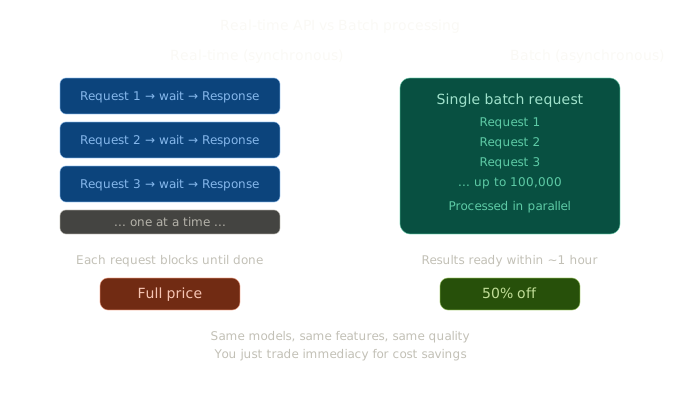
The trade-off is simple: you give up immediate responses in exchange for a 50% discount on all token costs. Same models, same features, same quality. You can include anything in a batch that you’d normally send to the Messages API, including extended thinking, tool use, structured outputs, PDF processing, and citations.
When to use batch processing
The key question is: does this request need an immediate response? If the answer is no, it should probably be a batch.
Real-world examples where batch makes sense: processing a backlog of support tickets, running your evaluation suite across hundreds of test cases, extracting data from a folder of invoices, generating summaries for a library of documents, content moderation across user submissions.
Examples where it doesn’t: a chatbot responding to a live user, real-time search augmentation, interactive coding assistants.
How it works in TypeScript
Here’s a complete example that creates a batch, monitors it, and retrieves results:
import Anthropic from "@anthropic-ai/sdk";

const client = new Anthropic();

// Step 1: Create the batch
const batch = await client.messages.batches.create({
  requests: [
    {
      custom_id: "ticket-001",
      params: {
        model: "claude-sonnet-4-6",
        max_tokens: 1024,
        messages: [
          {
            role: "user",
            content:
              "Classify this support ticket: 'My invoice shows the wrong amount'",
          },
        ],
      },
    },
    {
      custom_id: "ticket-002",
      params: {
        model: "claude-sonnet-4-6",
        max_tokens: 1024,
        messages: [
          {
            role: "user",
            content:
              "Classify this support ticket: 'I can't log in to my account'",
          },
        ],
      },
    },
    // ... up to 100,000 requests per batch
  ],
});

console.log(`Batch created: ${batch.id}`);
console.log(`Status: ${batch.processing_status}`);

// Step 2: Poll for completion
let status = batch;
while (status.processing_status !== "ended") {
  await new Promise((resolve) => setTimeout(resolve, 10000)); // wait 10s
  status = await client.messages.batches.retrieve(batch.id);
  console.log(
    `Processing: ${status.request_counts.succeeded} succeeded, ` +
      `${status.request_counts.processing} still processing`
  );
}

// Step 3: Retrieve results
for await (const result of client.messages.batches.results(batch.id)) {
  if (result.result.type === "succeeded") {
    const text = result.result.message.content[0];
    console.log(`${result.custom_id}: ${text.type === "text" ? text.text : ""}`);
  } else {
    console.log(`${result.custom_id}: ${result.result.type}`);
  }
}
A few important details:
custom_id is your identifier for each request. Results aren’t guaranteed to come back in order, so you use this to match results to requests. Make them meaningful (like ticket IDs or document names).
Processing time: Most batches complete within an hour, but the SLA is 24 hours. If a request hasn’t completed within 24 hours, it expires. Plan for this in your error handling.
Mix and match: Requests in a batch are independent. You can use different models, different parameters, even different features within the same batch. One request could use extended thinking while another uses structured outputs.
Size limits: Up to 100,000 requests per batch, with a total payload limit of 256MB.
Combining batch with other features
Remember the invoice extraction example from Part 4 combined with Structured Outputs? Run that through batch processing and you’ve got an enterprise document processing pipeline at half the cost:
const invoiceBatch = await client.messages.batches.create({
  requests: invoiceFiles.map((file, i) => ({
    custom_id: `invoice-${file.name}`,
    params: {
      model: "claude-sonnet-4-6",
      max_tokens: 4096,
      output_config: {
        format: {
          type: "json_schema",
          schema: invoiceSchema,
        },
      },
      messages: [
        {
          role: "user",
          content: [
            {
              type: "image",
              source: { type: "base64", media_type: "image/png", data: file.data },
            },
            { type: "text", text: "Extract all invoice data from this image." },
          ],
        },
      ],
    },
  })),
});
A thousand invoices, structured extraction, guaranteed schema conformance, at 50% off. That’s a hard deal to turn down.
Prompt caching: stop paying for the same tokens twice
Batch processing helps when you have many requests. Prompt caching helps when your requests share common content. And in most real applications, they share a lot of common content.
Think about a typical API application. Every request includes your system prompt. Most include tool definitions. Many include the same reference documents or conversation history. Without caching, you’re paying full price to process all of that shared content on every single request.
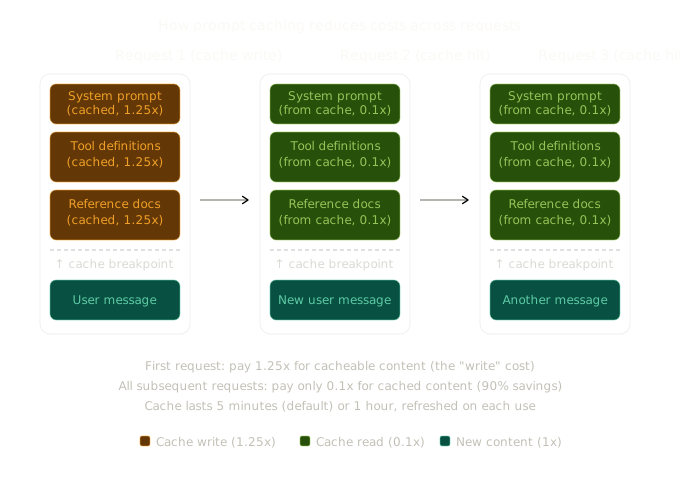
Prompt caching lets you mark content for reuse. The first request pays a slightly higher rate (1.25x) to write the content to the cache. Every subsequent request that includes the same prefix reads from the cache at just 0.1x the normal input cost. That’s a 90% discount on cached tokens.
Automatic caching (the easy way)
The simplest approach is automatic caching, where you add a single cache_control parameter at the top level of your request:
const response = await client.messages.create({
  model: "claude-sonnet-4-6",
  max_tokens: 1024,
  cache_control: { type: "ephemeral" },
  system: [
    {
      type: "text",
      text: "You are a customer support agent for Acme Corp. Here are the 50 pages of product documentation you need to reference...",
    },
  ],
  messages: [{ role: "user", content: "How do I reset my password?" }],
});
The system automatically caches everything up to the last cacheable block. On subsequent requests with the same prefix, the cached content is reused. The cache breakpoint moves forward automatically as conversations grow, so you don’t need to manage any markers yourself.
Explicit caching (more control)
For more control, you can place cache_control on specific content blocks. This is useful when you have multiple sections that change at different frequencies:
const response = await client.messages.create({
  model: "claude-sonnet-4-6",
  max_tokens: 1024,
  system: [
    {
      type: "text",
      text: "You are an expert financial analyst...",
      cache_control: { type: "ephemeral" }, // Cache the system prompt
    },
  ],
  tools: [
    {
      name: "query_database",
      description: "Query the financial database",
      input_schema: { /* ... */ },
      cache_control: { type: "ephemeral" }, // Cache tool definitions too
    },
  ],
  messages: [
    {
      role: "user",
      content: [
        {
          type: "document",
          source: {
            type: "base64",
            media_type: "application/pdf",
            data: annualReportData,
          },
          cache_control: { type: "ephemeral" }, // Cache the document
        },
        {
          type: "text",
          text: "What was the revenue growth rate?",
        },
      ],
    },
  ],
});
The cache follows a specific order: tools, then system prompt, then messages. Content is cached from the beginning up to each breakpoint. You can define up to 4 explicit breakpoints per request.
The 1-hour cache
By default, cached content expires after 5 minutes (refreshed each time it’s used). For scenarios where requests come less frequently, like a user chatting with a document and taking their time between questions, you can extend this to 1 hour:
cache_control: { type: "ephemeral", ttl: "1h" }The 1-hour cache costs 2x base input price for the write (instead of 1.25x for the 5-minute cache), but the read price is the same 0.1x. If your users take more than 5 minutes between messages, the 1-hour cache avoids expensive cache rewrites and can be significantly cheaper overall.
One constraint: if you mix TTLs in the same request, 1-hour entries must appear before 5-minute entries.
How to verify caching is working
The response usage object tells you exactly what’s happening:
console.log(response.usage);
// {
//   input_tokens: 12500,
//   output_tokens: 150,
//   cache_creation_input_tokens: 12000,  // First request: wrote to cache
//   cache_read_input_tokens: 0
// }

// On the second request:
// {
//   input_tokens: 12500,
//   output_tokens: 180,
//   cache_creation_input_tokens: 0,
//   cache_read_input_tokens: 12000  // Cache hit!
// }
If cache_read_input_tokens is zero on subsequent requests, something is invalidating your cache. Common culprits: changing tool definitions or tool order, modifying the system prompt, changing tool_choice, or including/excluding images.
What invalidates the cache
This matters in practice. Any change to the content before the cache breakpoint invalidates the entire cache. Specifically:
- Changing any text in the system prompt, tools, or cached messages
- Changing the order of tools
- Adding or removing images anywhere in the prompt
- Changing
tool_choice - Changing thinking parameters (enabled/disabled or budget)
Changing only the name or description of a tool does not invalidate (the schema and content is what matters). And content after the cache breakpoint can change freely without affecting the cache.
Minimum cacheable sizes
Not everything can be cached. There are minimum token thresholds:
- 1,024 tokens for most models (Opus 4.6, Opus 4.5, Sonnet 4.6, Sonnet 4.5, Sonnet 4)
- 2,048 tokens for Haiku 3.5
- 4,096 tokens for Opus 4.6 and Haiku 4.5
Prompts shorter than these minimums will be processed normally without caching, even if you add cache_control.
Using both together
Batch processing and prompt caching aren’t mutually exclusive. In fact, they work well together. Consider a batch of 1,000 invoice extraction requests where every request shares the same system prompt, tool definitions, and extraction schema. With caching, the shared context is processed once and reused across all 1,000 requests. With batch pricing, every request is 50% off.
The savings stack: batch gives you 50% off, caching gives you 90% off on cached tokens. On a workload with a large shared context and many requests, you can realistically achieve 90%+ total cost reduction compared to simple real-time processing.
One tip for batches specifically: since batch requests can take longer than 5 minutes to process, consider using the 1-hour cache duration to ensure cache hits don’t expire mid-batch.
A cost comparison
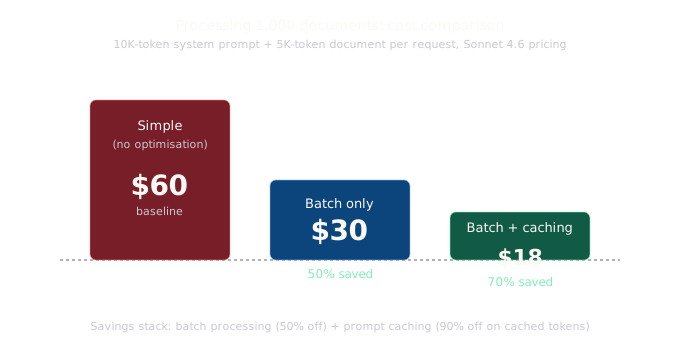
Let’s consider that document processing service. Imagine you’re processing 1,000 documents, each with a 10,000-token system prompt and 5,000 tokens of document content, generating 1,000 tokens of output per document. Using Sonnet 4.6 pricing ($3/M input, $15/M output):
Simple approach (no optimisation):
- Input: 1,000 × 15,000 tokens = 15M tokens × $3/M = $45.00
- Output: 1,000 × 1,000 tokens = 1M tokens × $15/M = $15.00
- Total: $60.00
Batch only:
- Everything at 50% off
- Total: $30.00
Batch + caching (system prompt cached):
- Cache write: 10,000 tokens × $3.75/M = $0.04
- Cache reads: 999 × 10,000 tokens × $0.30/M = $3.00
- Uncached input (documents): 1,000 × 5,000 tokens × $1.50/M = $7.50
- Output: 1,000 × 1,000 tokens × $7.50/M = $7.50
- Total: ~$18.04
That’s a 70% reduction from the simple approach. For workloads with larger shared contexts (like a 50,000-token system prompt), the savings are even more dramatic.
Practical guidance
Use batch by default for anything that isn’t user-facing. Evaluations, data processing, content generation, document analysis, if nobody is waiting for the response, put it in a batch.
Cache your system prompts and tool definitions. These change rarely and are included in every request. Even basic caching here saves money from day one.
Structure your prompts for cacheability. Put stable content (system prompt, tools, reference documents) at the beginning. Put variable content (user messages) at the end. This maximises the cacheable prefix.
Monitor your cache hit rates. Track cache_read_input_tokens vs cache_creation_input_tokens across your requests. If creation is consistently high and reads are low, something is invalidating your cache. Check the invalidation list above.
Consider the 1-hour cache for document Q&A. If users are uploading a document and asking multiple questions about it, the 5-minute default might expire between questions. The 1-hour cache costs more per write but avoids repeated reprocessing of the same document.
The optimisation layer
Batch processing and prompt caching are the features you reach for after you’ve built something with the capabilities from Parts 1-6. They’re the optimisation layer that makes everything else economically viable at scale.
Neither of these features will make your demo more impressive, but they’re the reason your demo can become a product someone actually pays for. Getting costs and latency under control is unglamorous work, but it’s the work that matters once you’re past the prototype stage.
Next in this series: Agent Skills, how to package domain-specific expertise into reusable modules that Claude can load on demand.
If you’re building with this stuff or just curious about it, I’d love to hear what you think. You can find me at robcost.com or reach out on LinkedIn.
References & further reading
- Batch processing, Claude API docs, Full documentation including rate limits, monitoring, and error handling
- Prompt caching, Claude API docs, Automatic and explicit caching, TTL options, and cache invalidation rules
- Anthropic pricing, Current per-model pricing including batch discounts and caching rates
- Batch processing cookbook (Anthropic), Official code examples for creating, monitoring, and processing batches