Teaching AI New Tricks
Part 8 of a series on Claude API features for builders
In Part 2 I covered how Tool Use lets Claude call functions and take actions. Tools are powerful, but they solve a specific problem: giving Claude the ability to do things. There’s a related but different problem that tools don’t solve: giving Claude the ability to know how to do things well.
Think about the difference between giving someone a hammer and teaching them carpentry. A tool definition tells Claude “you can call this function.” A Skill tells Claude “here’s how to approach this entire category of work, including the best practices, the common pitfalls, the templates, and the scripts that make the output professional.”
Agent Skills are Anthropic’s way of packaging domain-specific expertise into reusable, modular units that Claude can load on demand. They’re the difference between Claude that can generate a spreadsheet and Claude that generates a good spreadsheet, with proper formatting, appropriate chart types, and clean data organisation.
I’ve been building with Skills in my own project, GameForge, an AI-powered game creation platform where a team of AI agents collaboratively build web games. And Skills turned out to be one of the most impactful features in the whole system. I’ll use it as a running example throughout this post.
What is a Skill?
A Skill is a folder. That’s really it at its core. A folder containing a SKILL.md file (instructions in Markdown with YAML frontmatter), plus optional supporting files like scripts, templates, and reference materials. Claude reads the instructions and uses the supporting files when executing tasks.
Here’s a real example from GameForge. The platform’s Developer agent needs to write Phaser 3 game code, and there are dozens of patterns, conventions, and gotchas specific to the Phaser framework. Rather than cramming all of this into the system prompt, I packaged it as a Skill:
---
name: phaser-development
description: Phaser 3 TypeScript game development patterns including scene
  architecture, arcade physics, texture generation, config-driven design,
  and coding conventions. Use when implementing or modifying a Phaser 2D game.
---

# Phaser 3 Game Development Patterns

## Project Structure
The Phaser game project uses Vite + TypeScript with this layout:
  src/
    config.ts        - All game constants
    main.ts          - DOM entry point
    scenes/
      BootScene.ts   - Texture generation, asset setup
      MainScene.ts   - All gameplay goes here

## Config-Driven Design
- All game constants go in src/config.ts
- Scenes import from config - never hardcode values

## Common Pitfalls
For the most common Phaser 3 bugs, see PITFALLS.md.
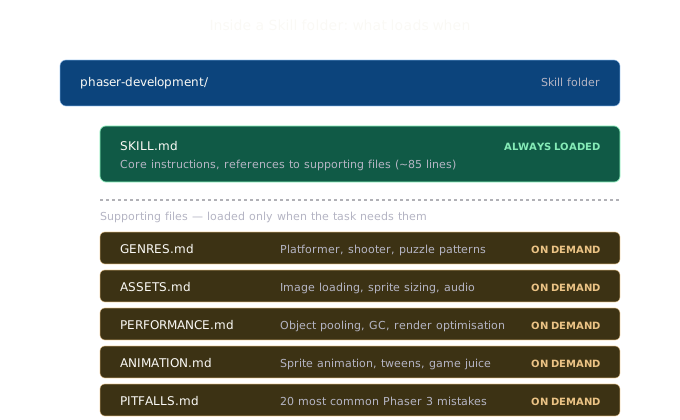
Notice the reference to PITFALLS.md at the end. The SKILL.md doesn’t contain everything, it points to separate files for specific topics. The full Skill folder looks like this:
phaser-development/
  SKILL.md          - Core instructions (~85 lines)
  GENRES.md         - Genre-specific patterns (platformer, shooter, etc.)
  ASSETS.md         - Image loading, sprite sizing, audio integration
  PERFORMANCE.md    - Object pooling, GC avoidance, render optimization
  ANIMATION.md      - Sprite animation, tweens, game juice effects
  PITFALLS.md       - The 20 most common Phaser 3 mistakes
Claude reads SKILL.md first. If the task involves a platformer, it reads GENRES.md. If it needs to optimise performance, it reads PERFORMANCE.md. The others stay unloaded. This is progressive disclosure in action, and it’s what makes Skills work at scale.
Progressive disclosure: the clever bit
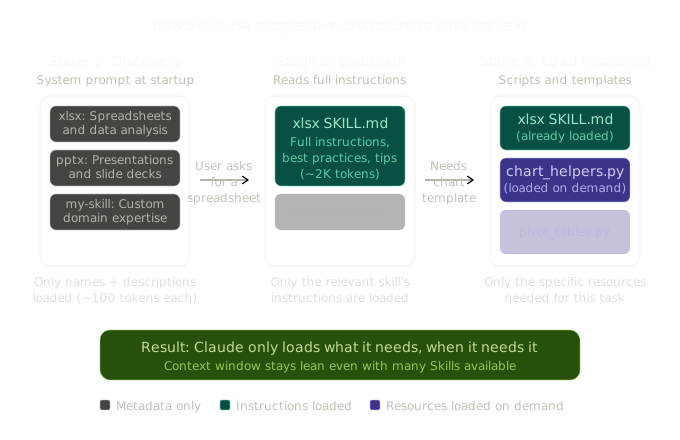
Stage 1: Discovery. At startup, Claude sees only the name and short description of each available Skill. This costs maybe 100 tokens per Skill, so even with dozens of Skills available, the context window impact is minimal.
Stage 2: Load instructions. When a user’s request matches a Skill’s description, Claude reads the full SKILL.md file. Now it has the detailed instructions, best practices, and knows what supporting files are available.
Stage 3: Load resources. As Claude works through the task, it reads specific supporting files only when needed. If the task doesn’t require animation patterns, ANIMATION.md never gets loaded.
How GameForge uses Skills in practice
GameForge has a multi-agent architecture: a Designer agent that creates game design documents, a Developer agent that writes Phaser code, and a QA agent that playtests using Playwright. Not all agents need the same expertise.
Here’s what I found: only the Developer agent gets the Skill tool in its allowed tools list:
const DEVELOPER_TOOLS = [
  'Skill',   // Can load phaser-development or threejs-development Skills
  'Read',
  'Write',
  'Edit',
  'Glob',
  'Grep',
  'mcp__game-tools__get_design_document',
  'mcp__game-tools__get_project_structure',
];

const QA_TOOLS = [
  'Read',    // No Skill tool - QA doesn't need engine expertise
  'Glob',
  'Grep',
  'mcp__playwright__navigate_to_game',
  'mcp__playwright__take_screenshot',
  // ...
];
The Developer’s system prompt explicitly names which Skills to use:
For Phaser 3 coding patterns (config-driven design, scene architecture,
textures, physics, HUD, mandatory controls), use the **phaser-development**
skill. For genre patterns see GENRES.md, for performance optimization see
PERFORMANCE.md, for animation and game feel see ANIMATION.md.
This explicit naming matters. The Developer agent doesn’t have to guess which Skill is relevant. The system prompt tells it where to look, and the Skill’s internal structure guides it to the right reference file for the specific sub-task.
Getting Skills into the session
One detail that tripped me up initially: the Claude Agent SDK discovers Skills from the filesystem relative to its working directory. In GameForge, each game-building session runs in its own project directory. So the Skills need to be in that directory for the SDK to find them.
The solution was a copySkills() function in the project scaffolder that copies Skills from the source repo into each session’s .claude/skills/ directory:
export function copySkills(projectPath: string): void {
  const skillsSource = resolve(
    process.cwd(),
    'apps/orchestrator/src/agents/skills'
  );

  if (!existsSync(skillsSource)) return;

  const targetDir = resolve(projectPath, '.claude', 'skills');
  if (existsSync(targetDir)) return;

  mkdirSync(resolve(projectPath, '.claude'), { recursive: true });
  cpSync(skillsSource, targetDir, { recursive: true });
}
Then the Agent SDK is configured with settingSources: ['project'] to discover Skills from the project’s .claude/skills/ directory:
const agentQuery = query({
  prompt: fullPrompt,
  options: {
    systemPrompt,
    model,
    cwd: session.projectPath,
    settingSources: ['project'],  // Enables Skill discovery
    allowedTools,
    // ...
  },
});
Testing Skills
One other recommendation: test your Skills. I have a test suite that validates every Skill’s structure, frontmatter format, description length, and file completeness:
describe('Agent Skills validation', () => {
  for (const def of SKILL_DEFINITIONS) {
    it('SKILL.md has valid YAML frontmatter', () => {
      const content = readFileSync(join(skillDir, 'SKILL.md'), 'utf-8');
      const frontmatter = parseFrontmatter(content);
      expect(frontmatter['name']).toBe(def.name);
      expect(frontmatter['name']).toMatch(/^[a-z0-9-]+$/);
    });

    it('SKILL.md body is under 500 lines', () => {
      const lines = content.split('\n').length;
      expect(lines).toBeLessThan(500);
    });

    it('all required files are non-empty', () => {
      for (const file of def.requiredFiles) {
        const content = readFileSync(join(skillDir, file), 'utf-8');
        expect(content.trim().length).toBeGreaterThan(0);
      }
    });
  }
});
This catches issues early, like a Skill that’s grown too large for the context window, or frontmatter that’s missing or malformed.
Pre-built Skills
Anthropic ships four pre-built Skills: xlsx (spreadsheets), pptx (presentations), docx (Word documents), and pdf (PDF generation). These are the Skills that power document creation in claude.ai.
Here’s how to use them via the API:
import Anthropic from "@anthropic-ai/sdk";

const client = new Anthropic();

const response = await client.beta.messages.create({
  model: "claude-opus-4-6",
  max_tokens: 4096,
  betas: ["code-execution-2025-08-25", "skills-2025-10-02"],
  container: {
    skills: [
      { type: "anthropic", skill_id: "xlsx", version: "latest" },
    ],
  },
  messages: [
    {
      role: "user",
      content: "Create a sales dashboard spreadsheet with monthly revenue and a trend chart.",
    },
  ],
  tools: [{ type: "code_execution_20250825", name: "code_execution" }],
});
Skills require the code execution tool because they run in the VM. You can combine multiple Skills in a single request by adding them to the skills array.
Skills vs prompts vs tools
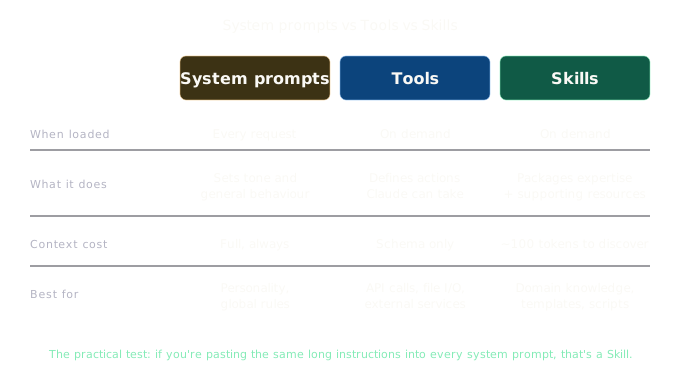
System prompts are conversation-level instructions. They consume context on every request. Great for tone and general behaviour.
Tools define actions Claude can take. They don’t teach Claude how to do something well.
Skills package expertise. They load on demand, persist across conversations, and can include executable resources.
The practical test: if you find yourself pasting the same long instructions into your system prompt across multiple conversations, that’s probably a Skill waiting to happen.
Skills across Claude’s products
Skills work across the Claude ecosystem:
- Claude API: Pre-built and custom Skills via the
containerparameter - Claude Code: Custom Skills as
.claude/skills/directories, no API upload needed - Claude.ai: Pre-built Skills work automatically, custom Skills uploadable via settings
- Agent SDK: Custom Skills via filesystem-based configuration with
settingSources
The filesystem-based approach is particularly nice for project-specific Skills. In GameForge, the Skills live in the repo, are version-controlled, and are automatically available to any developer who clones the project.
Trade-offs and limitations
Code execution required. Skills run in the VM, adding latency and cost.
No cross-surface sync. Skills uploaded to the API aren’t available in claude.ai and vice versa.
Still in beta. Requires beta headers. The API may change.
Security matters. Custom Skills can instruct Claude to execute arbitrary code. Audit content before deployment. Anthropic’s enterprise guide covers this in detail.
Why this matters
The GameForge project taught me this clearly. Without Skills, the Developer agent’s system prompt would need thousands of tokens of Phaser patterns, genre guidance, performance tips, and common pitfalls, all loaded on every single request regardless of what the task actually needed. With Skills, the system prompt just says “use the phaser-development skill” and the agent loads exactly what it needs for the specific task. The context window stays lean, the agent performs better, and the expertise is maintained in a structured, testable, version-controlled format.
Skills change how you build. Instead of configuring an AI for each conversation, you’re giving it real competencies it can pull from when needed. For anyone building multi-agent systems or domain-specific AI tools, they’re worth the investment.
Next in this series: The Agent SDK, where we take everything we’ve been building with the raw API and graduate to a proper agent framework.
If you’re building with this stuff or just curious about it, I’d love to hear what you think. You can find me at robcost.com or reach out on LinkedIn.
References & further reading
- Agent Skills overview, Claude API docs, Architecture, progressive disclosure, and Skill types
- Agent Skills quickstart, Getting started with pre-built Skills in the API
- Agent Skills best practices, Authoring guidelines for effective custom Skills
- Skills for enterprise, Governance, security review, and deployment
- GameForge source code, The multi-agent game creation platform used as an example throughout this post